About
A plugin for Rhinoceros 8 that integrates AI image generation into the architectural workflow. The architect captures a 3D viewport, describes the desired visualization in a prompt, and receives a photorealistic render in seconds — without leaving Rhino. Features include multi-layer inpainting with per-region instructions, reference image support, multi-angle camera rotation (fal.ai), 4x upscaling, and A/B comparison. Built as a docked WebView2 panel running a React SPA, backed by an ASP.NET Core sidecar on localhost, communicating with Rhino via a custom C# → JavaScript bridge (9 exposed methods). Generation jobs run asynchronously with real-time SSE progress. All data stored locally in SQLite with DPAPI-encrypted API keys.
Gallery
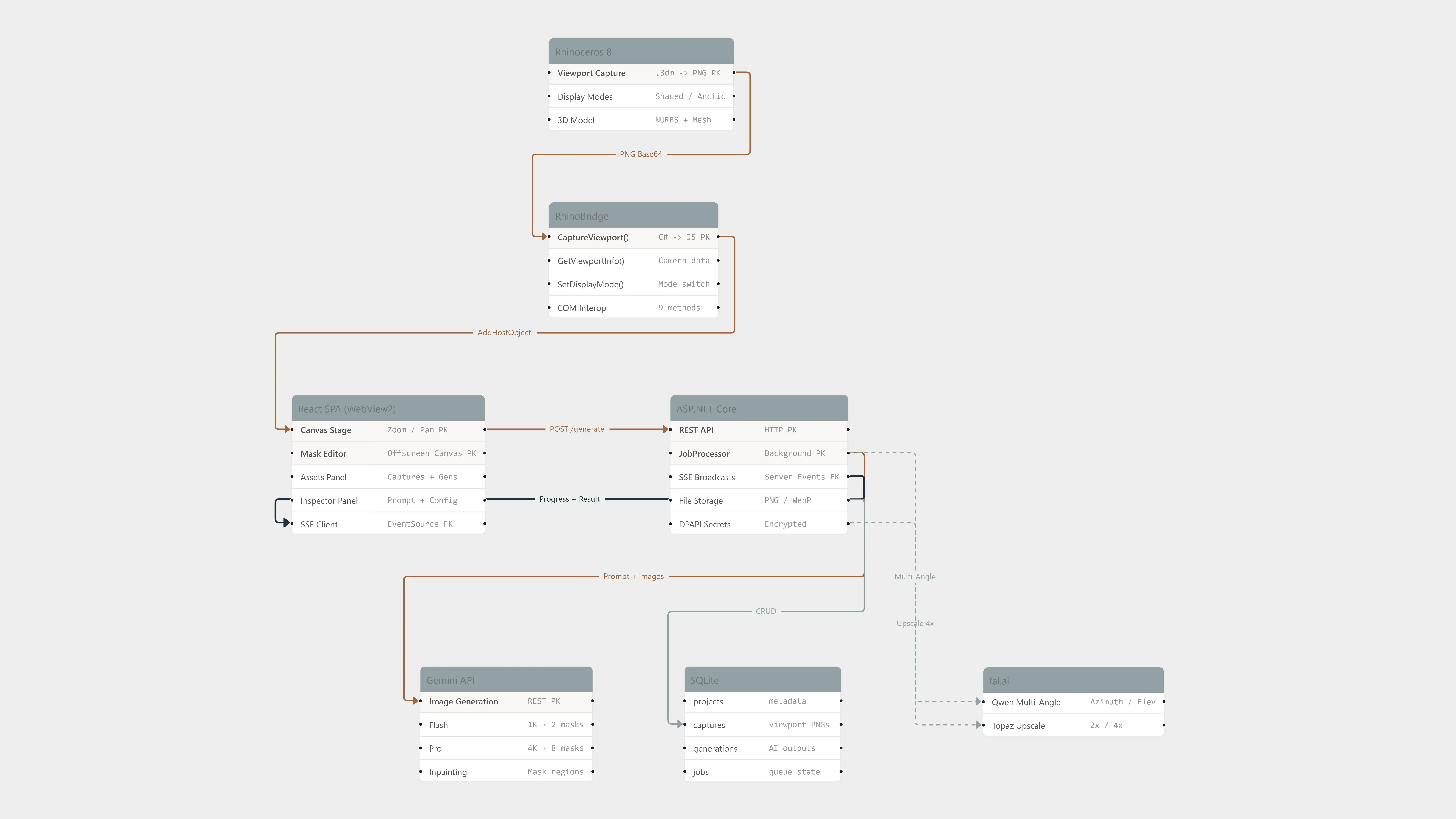
System Architecture — Rhino → RhinoBridge → React SPA → ASP.NET Core → Gemini API
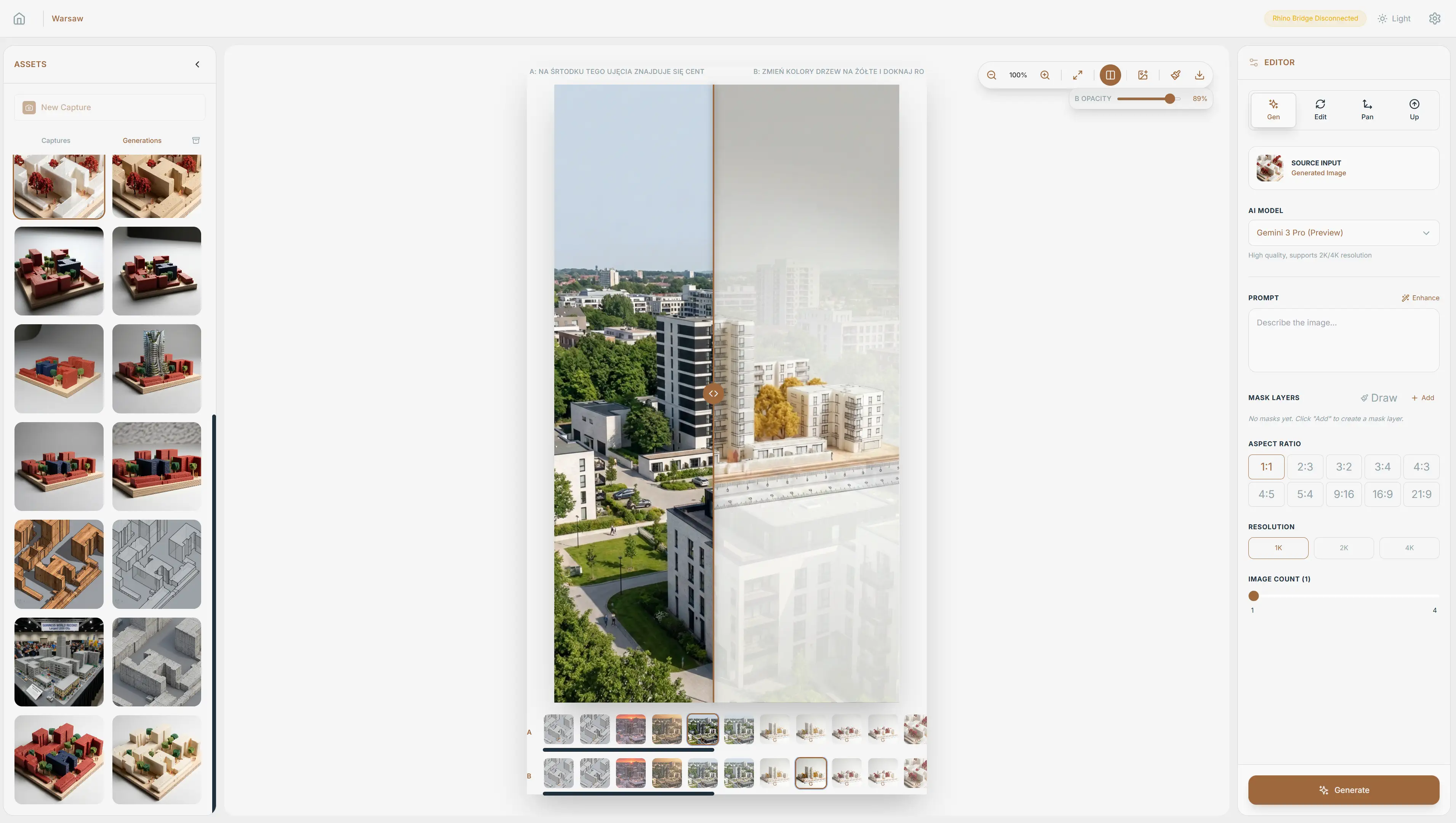
Before / After — Rhino viewport capture transformed into photorealistic visualization by AI
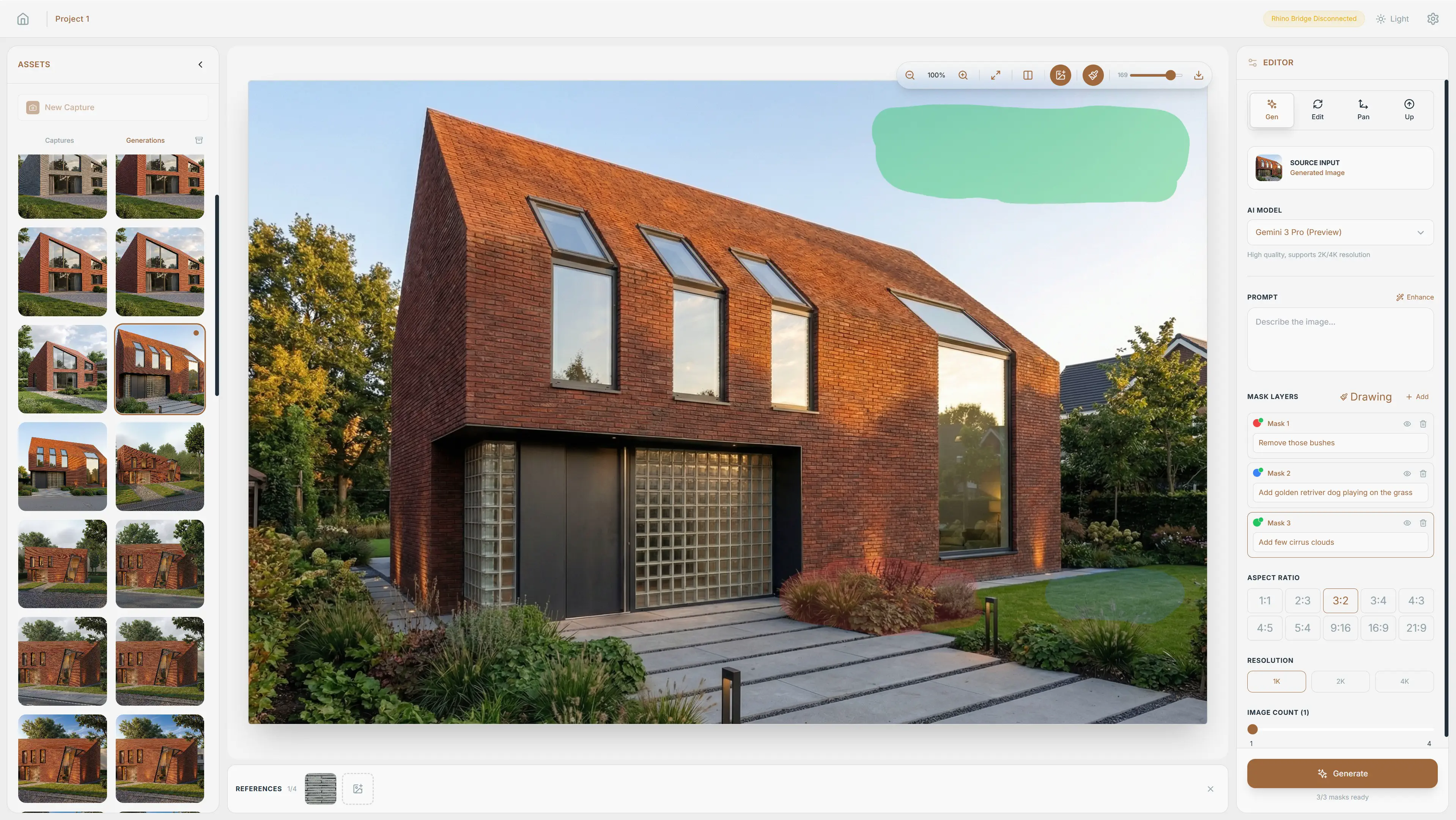
Inpainting Masks — colored regions with per-area AI editing instructions
Code
// RhinoBridge.cs — 9 methods exposed to JavaScript via WebView2
[ComVisible(true)]
public class RhinoBridge
{
    public string CaptureViewport(int width, int height, string displayMode)
    {
        var view = RhinoDoc.ActiveDoc.Views.ActiveView;
        var capture = new ViewCaptureSettings(view, new Size(width, height));
        capture.SetDisplayMode(
            DisplayModeDescription.FindByName(displayMode));

        using var bitmap = ViewCapture.CaptureToBitmap(capture);
        using var ms = new MemoryStream();
        bitmap.Save(ms, ImageFormat.Png);
        return Convert.ToBase64String(ms.ToArray());
    }

    public string GetViewportInfo()  // camera position, target, lens
    public void SetDisplayMode(string mode)  // Shaded, Arctic, Rendered
    // ... 6 more methods
}
C# bridge exposed to JavaScript via WebView2 AddHostObjectToScript — captures Rhino viewport as Base64 PNG
export function exportMasksAsOverlay(
  sourceImage: HTMLImageElement,
  maskLayers: MaskLayer[]
): string {
  // Offscreen canvas at source resolution (not screen resolution)
  const canvas = document.createElement('canvas');
  canvas.width = sourceImage.naturalWidth;
  canvas.height = sourceImage.naturalHeight;
  const ctx = canvas.getContext('2d')!;

  // Draw original image as base
  ctx.drawImage(sourceImage, 0, 0);

  // Overlay each mask layer with its assigned color
  ctx.globalAlpha = 0.65;
  for (const layer of maskLayers) {
    ctx.globalCompositeOperation = 'source-over';
    ctx.drawImage(layer.canvas, 0, 0);

    // 3px border around mask regions for AI clarity
    ctx.strokeStyle = layer.color; // #e74c3c, #3498db, ...
    ctx.lineWidth = 3;
    traceMaskContour(ctx, layer.canvas);
  }

  return canvas.toDataURL('image/png');
}
Composites colored mask layers onto source image at native resolution — the overlay is sent alongside the clean image to Gemini API
private string BuildAugmentedPrompt(GenerateRequest req)
{
    var sb = new StringBuilder();
    sb.AppendLine("IMAGE 1 is the ORIGINAL clean photograph/render.");
    sb.AppendLine("IMAGE 2 is the SAME image with colored overlay.");
    sb.AppendLine("EDITING INSTRUCTIONS BY COLOR:");

    foreach (var mask in req.MaskLayers)
    {
        var color = GetColorName(mask.HexColor);
        sb.AppendLine($"- ${color} (${mask.HexColor}) regions: "
                     + mask.Instruction);
    }

    sb.AppendLine($"Overall scene context: ${req.Prompt}");
    return sb.ToString();
}

// Result sent to Gemini API:
// IMAGE 1 is the ORIGINAL clean photograph/render.
// IMAGE 2 is the SAME image with colored overlay.
// EDITING INSTRUCTIONS BY COLOR:
// - RED (#e74c3c) regions: replace with green roof
// - BLUE (#3498db) regions: glass curtain wall facade
// Overall scene context: modern building, warm evening light
Builds augmented prompt that pairs clean image + color-annotated overlay with per-region editing instructions for Gemini API