I was done with visualisations in a chat window. I built Proposition Studio
I used to make AI visualisations in a chat window, and after a dozen messages I no longer knew which version was the good one. So I built an app where a building has its own project, a version history, references and a selected region instead of another paragraph of prompt. On the assumptions, the examples, and what this tool does not do.
Chat is the wrong place for a visualisation.
Image models are now good enough to turn a screenshot from a 3D program into an image that looks like a photo of the finished building. The trouble starts a moment later. The first image is almost never the one that goes to the client. The brick needs to be lighter, the dusk version needs checking, the tree covering the entrance has to go. Visualisation is work on variants, and a chat window is built for conversation.
For a few months that is exactly how I made visualisations. A viewport capture from Rhino, a chat window, a prompt. Every prompt started with the same block of rules, because without it the model would improve my design for me. Here is a fragment:
1. PERSPECTIVE IS PIXEL-LOCKED:
   (...)
   - Do NOT straighten verticals, correct lens distortion, re-center
     the composition, rotate, zoom, tilt, or "improve" the framing in any way
   (...)
2. GEOMETRY IS SACRED:
   (...)
   - Count the windows in the input. Your output must have the SAME
     number in the SAME positions
   (...)
Think of yourself as a texture artist, not an architect.
The architecture is done. You dress the surfaces.
After a dozen messages in one thread, model captures, successive facade versions, mistakes and material boards were all mixed together. "The good one, with the grey brick" was somewhere further up. I described the part to change in words. When the model moved the camera or added a window along the way, I started over. The building had no place of its own. It had a thread.
The problem was the interface. I wanted projects, a version history I could go back to, an archive for failed attempts, a place for a moodboard and references, selecting a region on the image, and many variants from one source. I did not find that in an existing tool, so I built my own.
What I built
Proposition Studio is a browser app for architectural visualisation. I upload an image: a viewport capture from a 3D program, a model without materials, a physical model or an ordinary photo. I describe what I want to see and get a visualisation that is supposed to keep the same framing. Then I change parts, add references and make variants, and every version stays in the project.
No plugin to install, no model to export. A screenshot is enough.
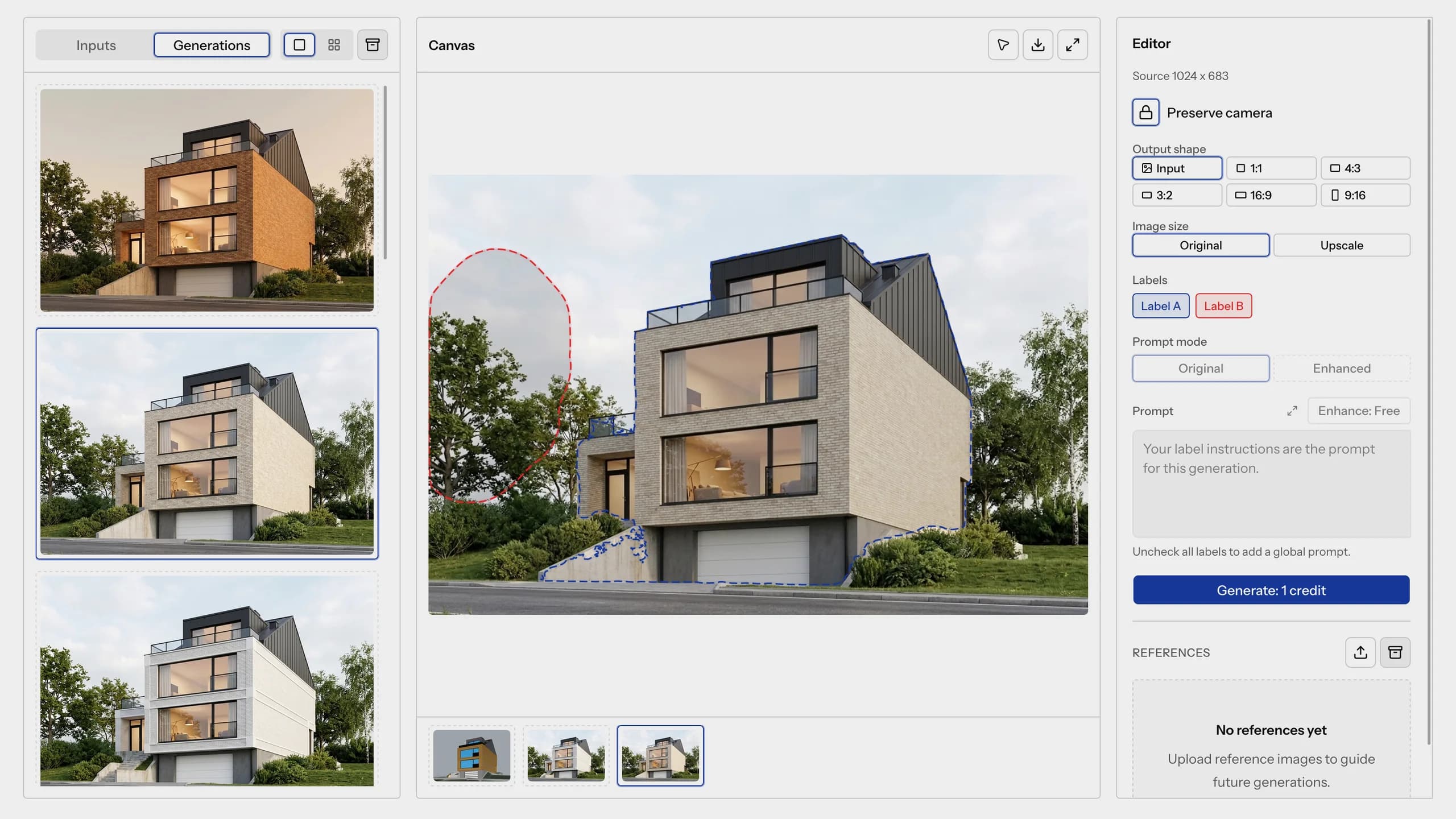
The screen is in the image at the top of this post. It has three parts. On the left, inputs and generations. In the middle, the canvas with the image I am working on. On the right, the editor: camera lock, output format, prompt and references. The app has a Polish and an English version; the screenshots in this post come from the English one.
Five assumptions
A project instead of a thread
Every building has its own project, with three kinds of things in it: input images, generations and references. Failed attempts go to the archive. They disappear from view but stay in the project, and I can bring them back at any time. I archive whole projects the same way.
Every version stays
The result of a generation can be the source of the next one. Under the canvas you can see the image's history: from the model capture, through successive generations, to the version in front of me. I click any step and go a different way from there, for example once into dark brick and once into wood.
In one of my projects the path is eight generations long. In a chat, after eight generations I would no longer know what came from what. Here I see it on one strip.
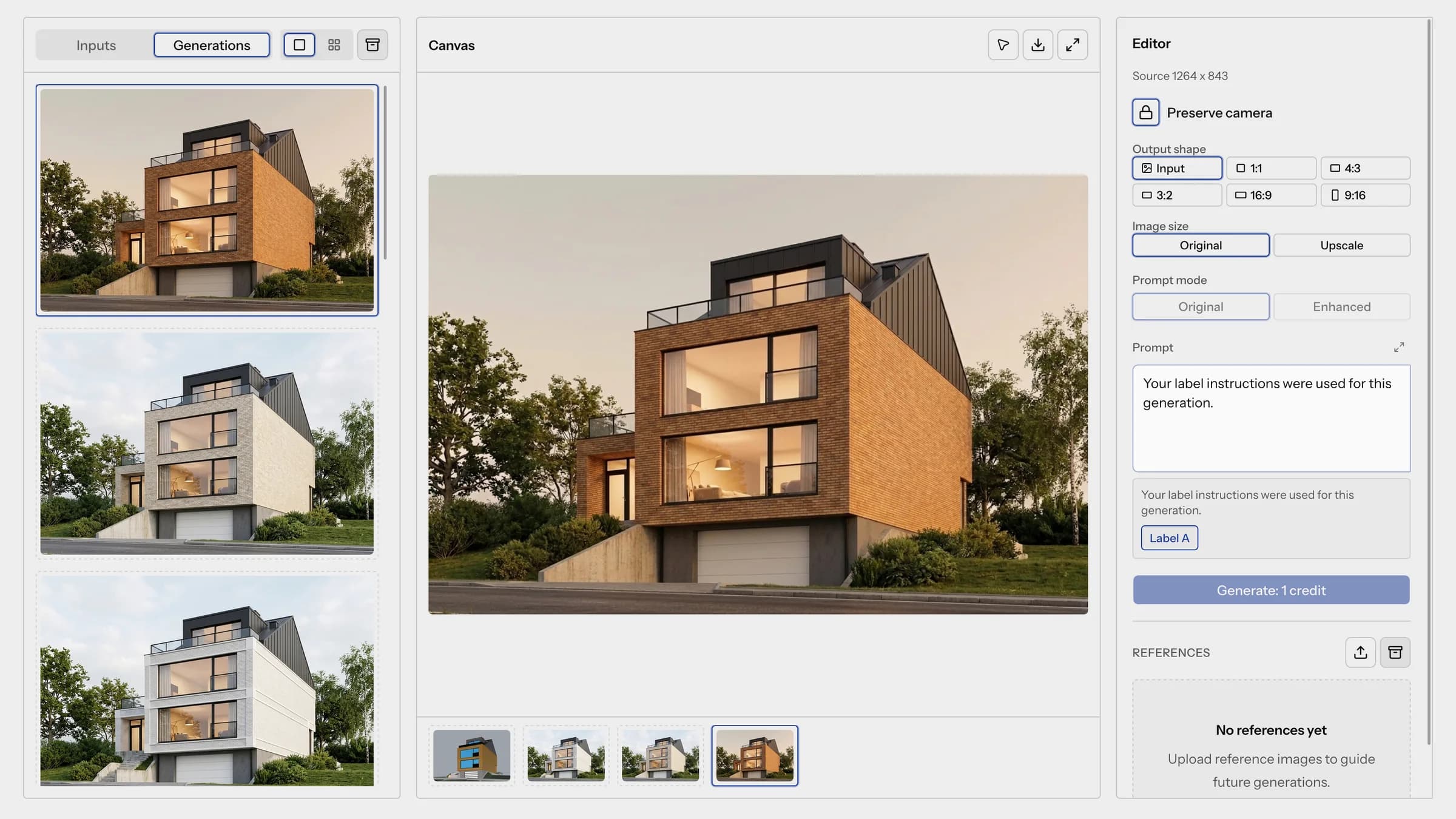 The strip under the canvas: the model and three generations of the same house, from a white facade to brown brick in the evening. On the left, the same three generations as a list.
Camera lock
The "Preserve camera" switch replaced my block of rules. Camera angle, framing and massing have to be the same in every version. That is what makes variants comparable: they should differ only in what I changed.
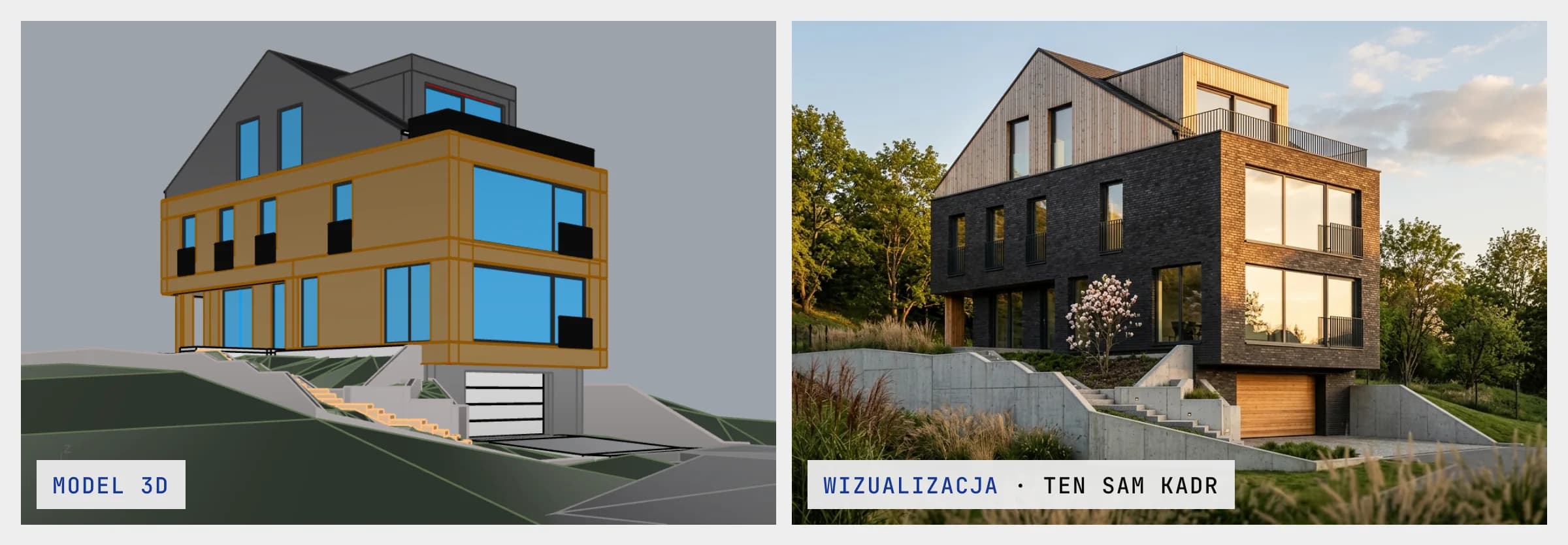 On the left a capture from the model in working colours, on the right the visualisation. The camera stands in the same place.
I select instead of describing
Corrections in a visualisation are usually small. One of my instructions read: "remove the lightning rod from the corner of the building (...)". For a change like that I do not want to write a paragraph about what must not be touched.
So I select the part to change on the image. I click an object, point at a surface or paint an area with a brush. Each selection gets a label and its own instruction: change the material, remove, add, replace. In one generation I can mark up to four places.
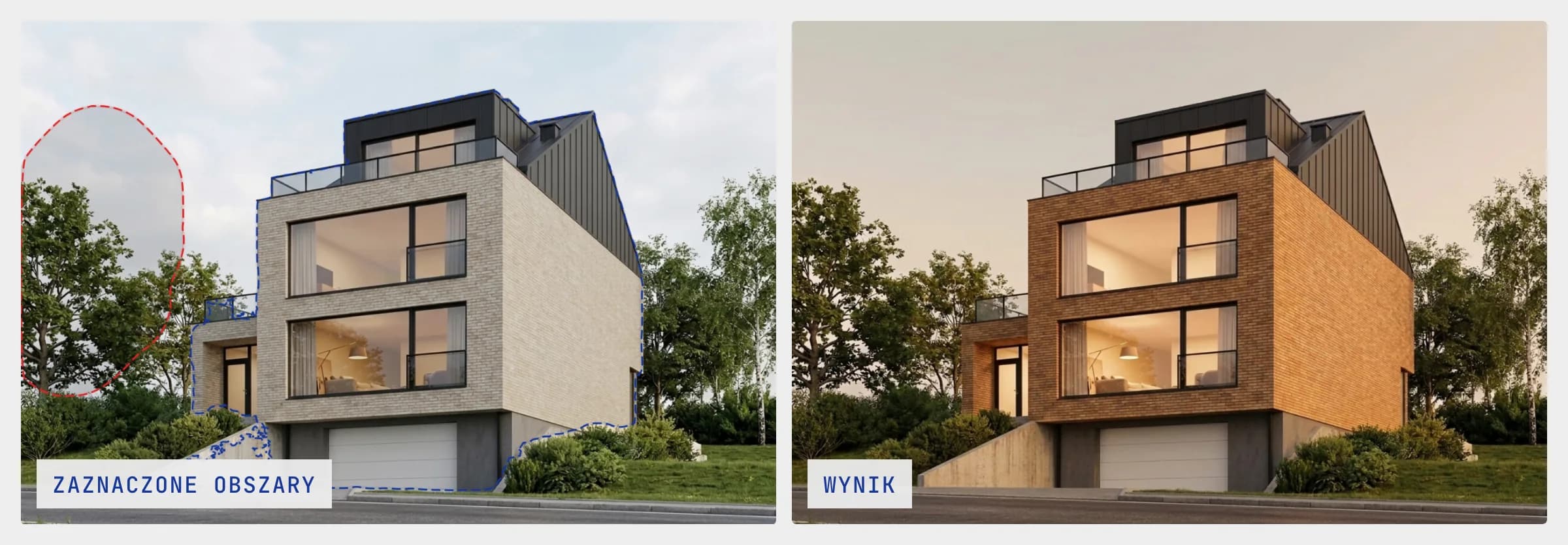 The blue outline is label A, the red one is label B. On the right, the result of label A: different brick and different light, the same massing and the same framing.
Material from a sample
"Grey brick" means something different to me, to the client and to the model. So I upload references to the project: a sample board, a photo of a facade, an inspiration. I can attach four to one generation. I can also assign a reference to a specific label, so the material lands only on the facade.
Examples
From model to visualisation
The simplest case. The input is a viewport capture from a 3D program, often in working colours, without materials. The output is the same framing as a photo.
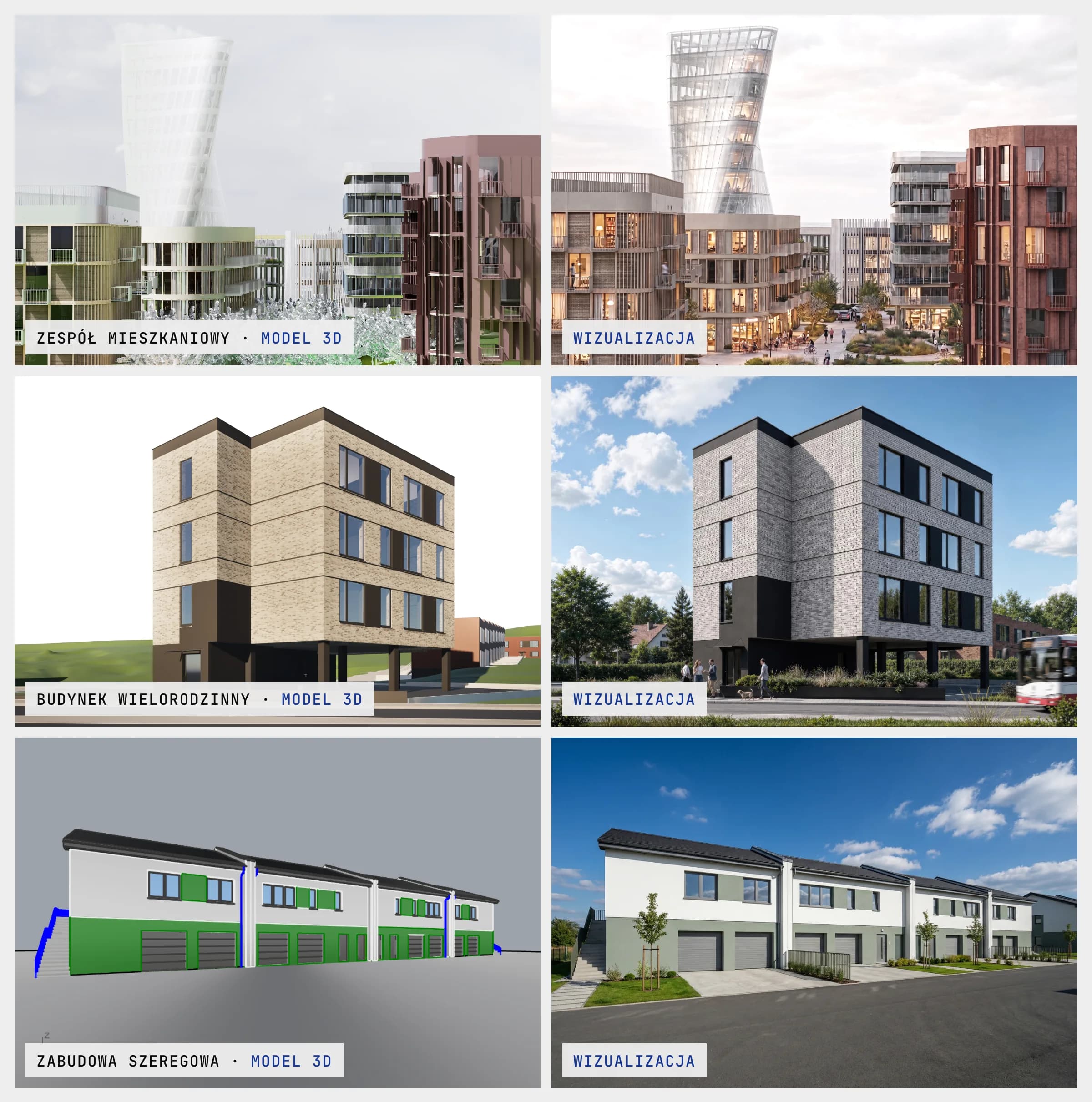 A housing estate, a multi-family building and terraced houses. On the left what I uploaded, on the right the result.
One house, more than twenty versions
This is the case I built the whole tool for. One house, three sample boards and more than twenty versions: black brick, grey brick, wood, a physical model, then the same house at golden hour, at dusk and in winter. Seven of them below.
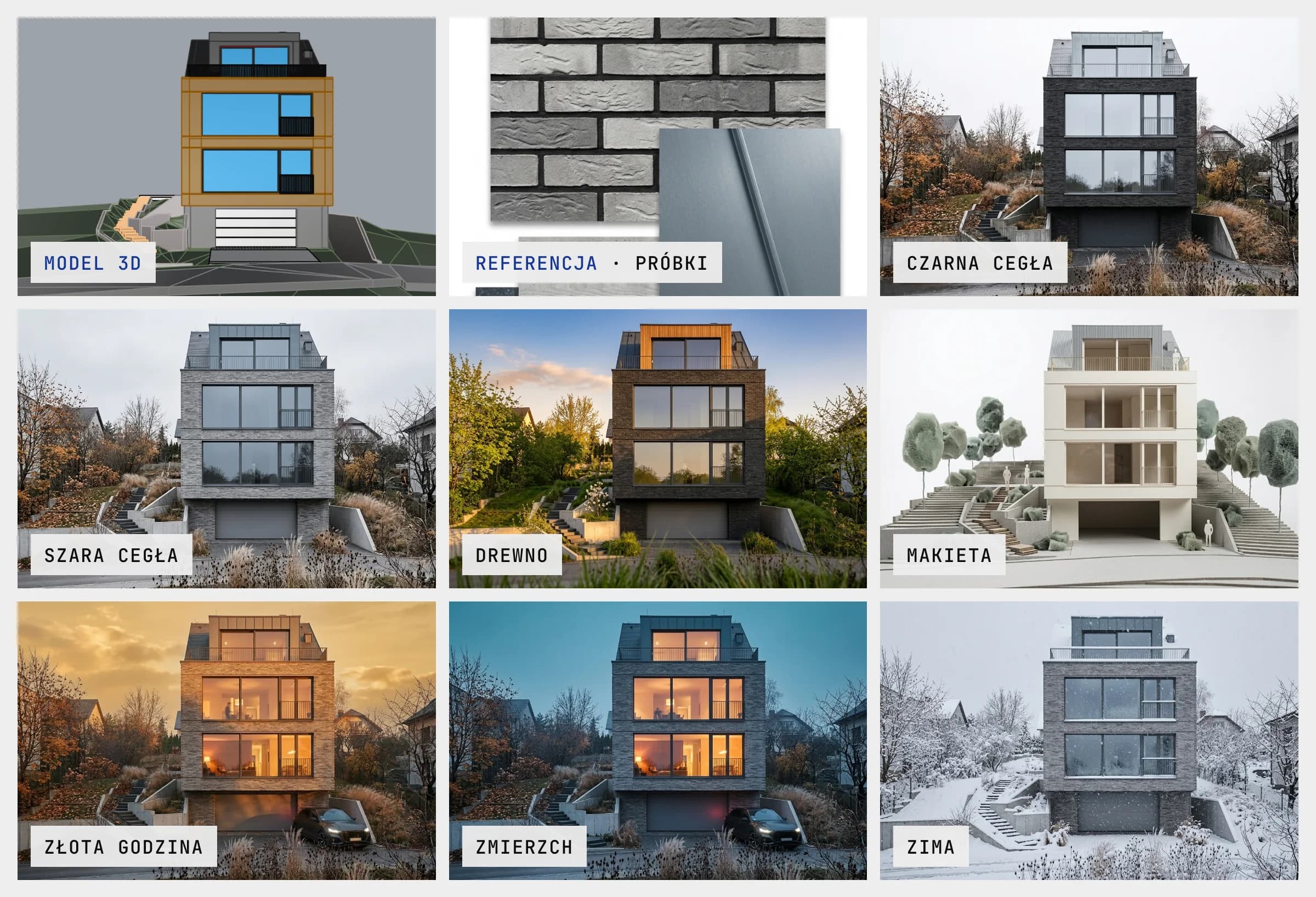 The model, the sample board and seven versions of the same house.
I bring a few facade versions to the meeting. The conversation is then about choosing.
And a few frames from other projects
To finish, six images without commentary.
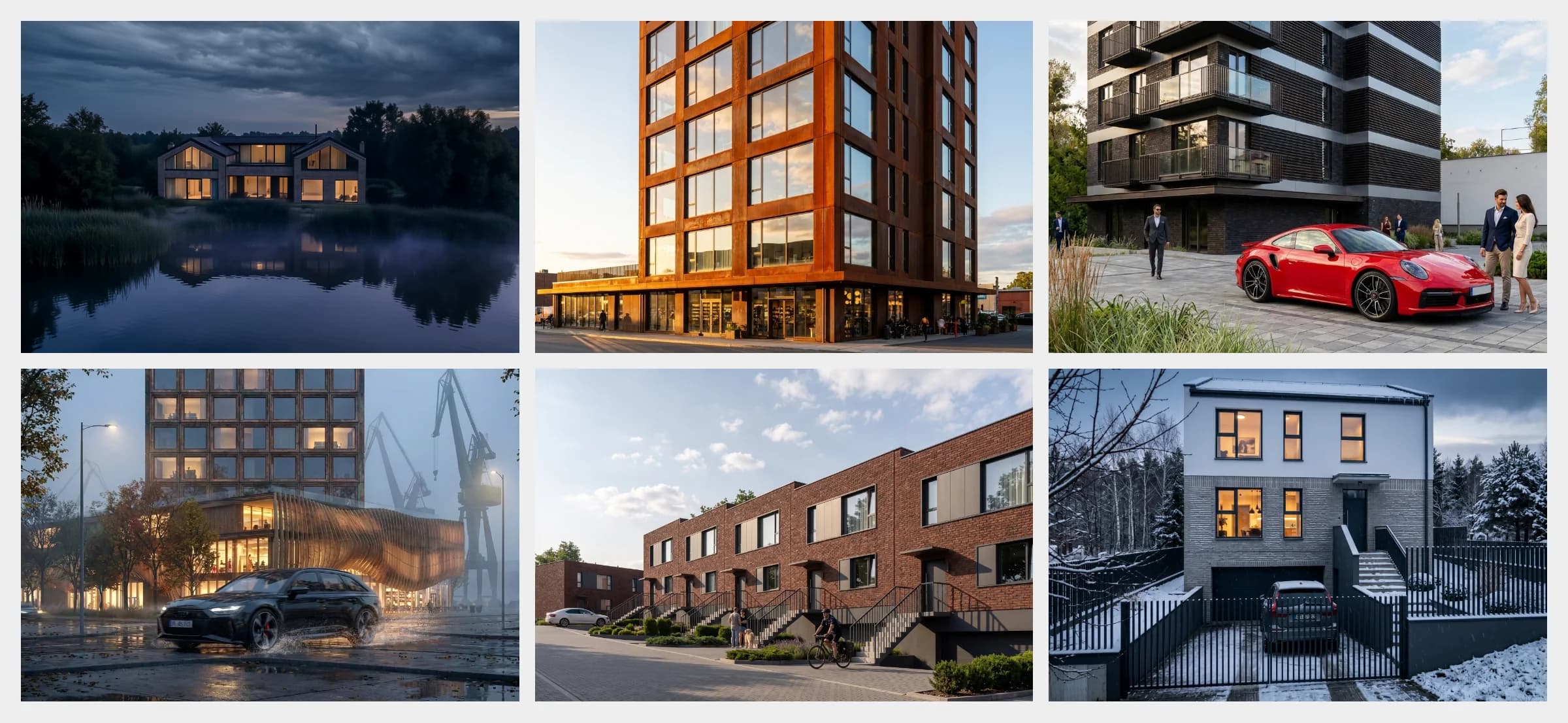 A house by the water, a corten tower, a residential building, a pavilion by shipyard cranes, terraced houses and a house in winter.
Why not chat, a generator or a node editor
There are many AI visualisation tools, and more every month. The ones I know fall into three groups.
The first is chat. Good models and an interface for conversation. Enough for one picture. Not for a project with twenty versions.
The second is generators of the "upload a model, collect a render" kind. Their promise is the first image. A good start, but for me the work only begins after it.
The third is node editors such as ComfyUI. Full control, as long as you build the graph yourself. I know them from my own work. An architect before a client meeting just wants to change the brick.
Proposition Studio does not compete on the number of models or features. It is meant to carry one project from the first image to the chosen variant and remember the way there. I am building it as an architect, for my own work, and the features came from whatever slowed me down in that work.
How it came about
The first version was a Rhino plugin, where the visualisation was made without leaving the 3D program. Then came a Mac app, and since June Proposition Studio has run in the browser. The images in this post were made in my projects in the app, including its earlier versions.
I built Proposition Studio alone, with AI agents as the team. I decide what should be built and why, the agents write the code, and changes go through tests and an independent review. Since May that has added up to more than 170 merged changes. Technically it is a React app on Cloudflare Workers with a Postgres database. Besides the studio itself there is everything you need before letting people in: sign-in, credit billing, an admin panel, two languages, terms of service and a privacy policy.
The model that generates the image is the least permanent part of it. When a better one appears, I can swap it in, and the projects, history and selections stay. What decides the result is what is built around the model.
What it does not do
- It does not read the 3D model. It works on an image, so it knows nothing about dimensions, layers or materials from the model. It knows as much as the screenshot shows.
- It gives no guarantees. The camera lock and the selections strongly limit what the model can change, but it is still a generative model. Now and then it adds a detail or changes something next to the selection. That is why I compare every version with the source, archive a bad step and go back one.
- It does not replace a render for documentation or a polished visualisation for a large campaign. It is for a conversation about direction, with a client or within the team.
- It is not open to everyone yet. Version 1.0 is available by invitation, and I let new people in in stages.
What next
Version 1.0 came out on 6 October 2026. Now I want to see how other people work in it. If you make visualisations, leave your e-mail at propositionstudio.com, and I will get back to you with access. Billing is by credits, no subscription: packs start at 4 USD, and one generation is one credit.
I also have two questions. Which client correction takes you the most time? And has the first AI image ever been the one that went to the client? Write to me, I would be glad to talk about it.