Loading...
Homelab Infrastructure
Self-Hosted Docker Platform with GPU Offload
Docker / Cloudflare Tunnel / Immich / Open WebUI / Jellyfin / CouchDB / Umami Analytics
About
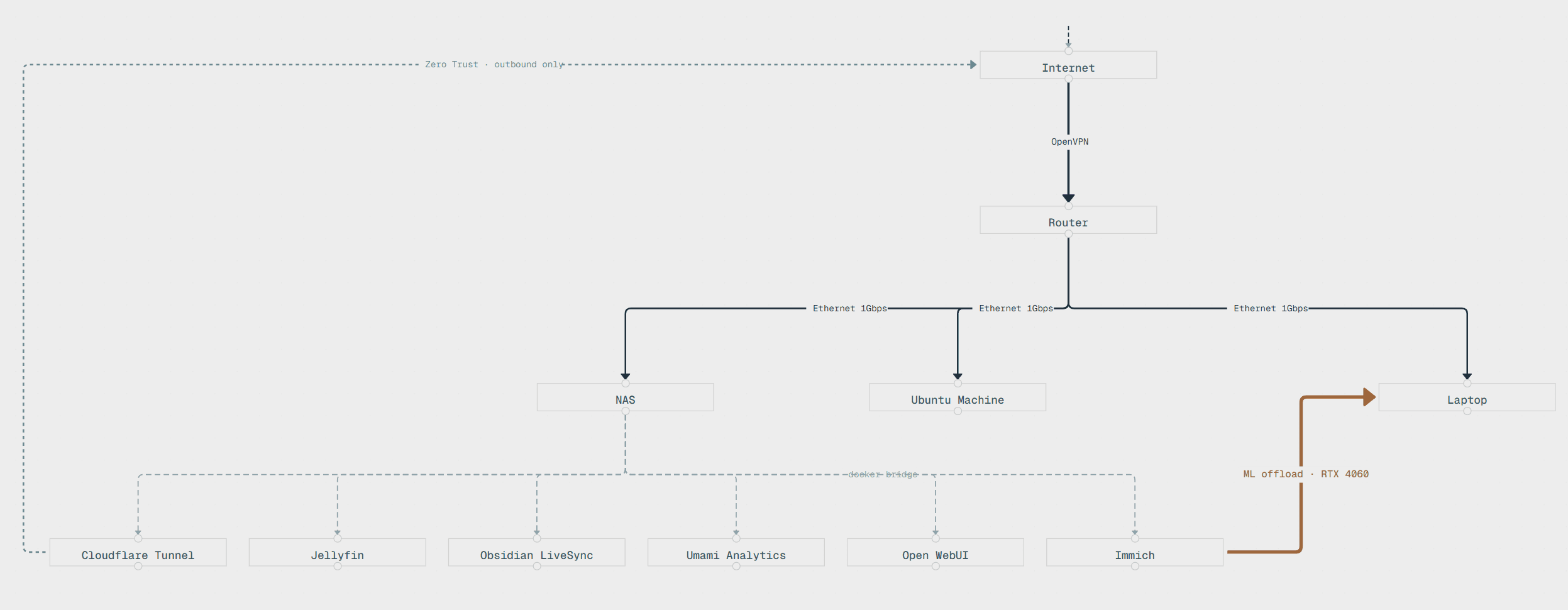
I got tired of paying for SaaS subscriptions and storing files across random drives. So I sold my gaming PC, bought a NAS, and built a self-hosted platform. Photos, backups, finances, LLM interface, all running in Docker on hardware I own. The setup grew into a three-machine network: a NAS for storage and containers, a 12-year-old desktop nobody wanted that I wiped clean, installed Ubuntu on, and turned into a remote AI workstation, and my laptop lending its GPU for ML inference over LAN.
Why
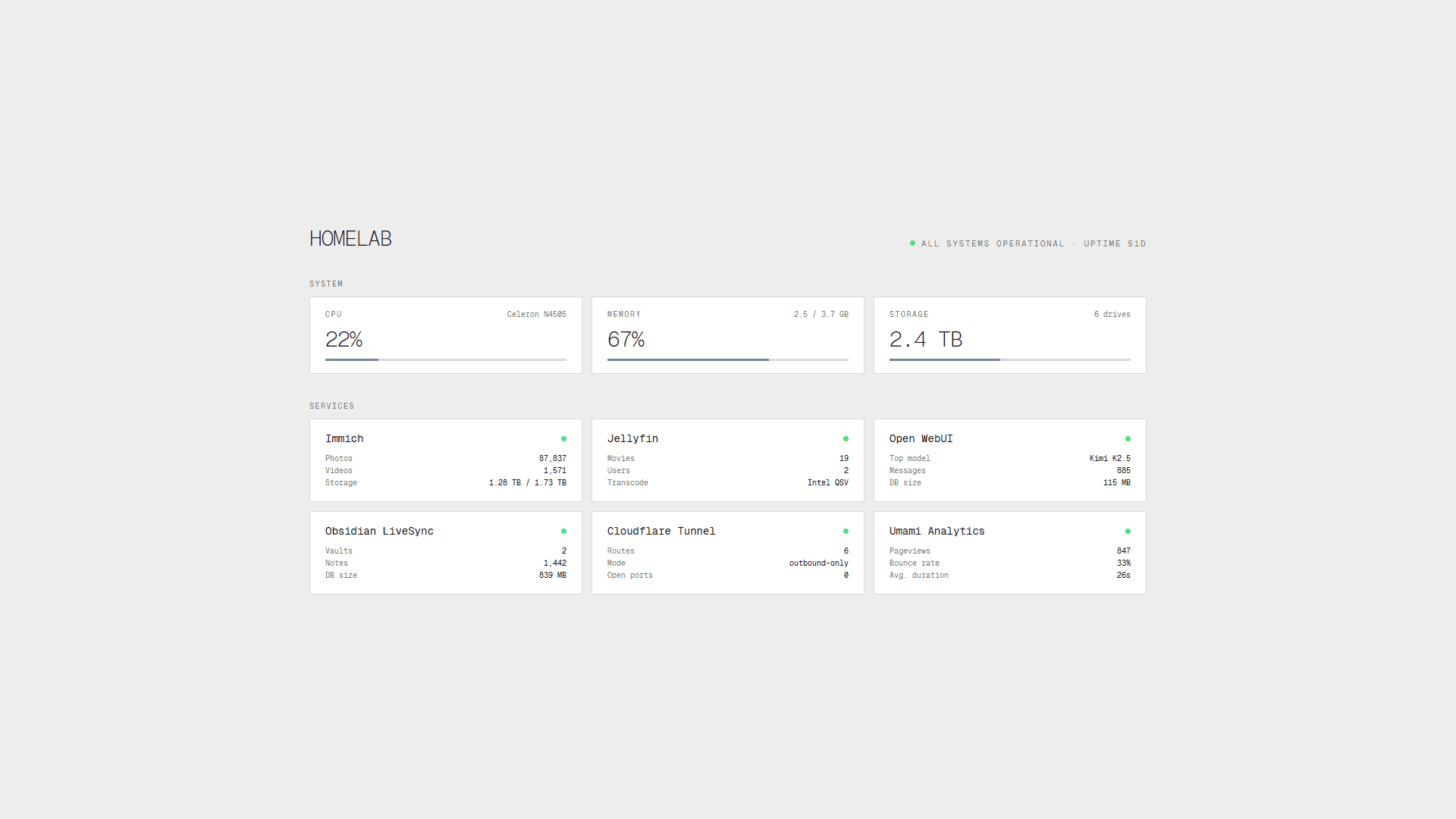
Subscriptions kept stacking up for things I could run myself. I needed a machine that could hold 86 thousand photos with face detection, OCR, and smart search. All private, all on hardware I own. One server instead of five SaaS tabs.
Goal
Learn how containers, networking, and self-hosted services actually work by building a platform I can keep expanding with whatever interests me next.
What It Does
All my files in one place, accessible remotely 24/7 from my own server. Photos sync instantly with smart search, face detection in 0.3 seconds instead of 3.2 on CPU, and OCR built in. 86 thousand photos indexed. Personal finances tracked on a self-hosted ledger. LLM interface running on my own hardware. A 12-year-old desktop sitting in the corner quietly running AI agents.
Gallery
Code
docker-compose.yml
Unified Docker bridge network with GPU offload. ML inference routed to laptop GPU over LAN, video transcoding via Intel QSV on NAS
1
2
3
4
5
6
7
8
9
10
11
12
13
14
15
16
17
18
19
20
# Unified bridge networknetworks: app_network: driver: bridge services: immich-server: image: ghcr.io/immich-app/immich-server:release networks: [app_network] volumes: - /data/photos:/usr/src/app/upload environment: IMMICH_MACHINE_LEARNING_URL: "http://<GPU_HOST>:<ML_PORT>" # ML inference offloaded to laptop (RTX 4060) jellyfin: image: jellyfin/jellyfin networks: [app_network] devices: - /dev/dri:/dev/dri # Intel QSV hardware transcodinggpu-offload.md
GPU offload pattern. Splitting ML inference across LAN to extract 10x performance from idle hardware
1
2
3
4
5
6
7
8
9
10
11
12
13
14
15
16
17
18
# GPU Offload Pattern Problem: NAS has no GPU. ML inference (face detection, image classification) is 10x slower on CPU. Solution: Split service into two hosts over LAN. NAS Laptop +----------------+ +--------------------+ | storage + API |---- LAN ---->| ML runtime | | photos/videos | 1 Gbps | NVIDIA RTX 4060 | +----------------+ | CUDA acceleration | +--------------------+ Config: IMMICH_MACHINE_LEARNING_URL=http://<GPU_HOST>:<ML_PORT> Result: Face detection 0.3s vs 3.2s (CPU). Smart search indexing overnight: 50k photos in 4h vs 40h.cloudflare-tunnel.yml
Zero Trust remote access. No open ports, outbound-only tunnel with per-service access policies
1
2
3
4
5
6
7
8
9
10
11
12
13
14
# Cloudflare Tunnel configtunnel: <tunnel-id>credentials-file: /etc/cloudflared/credentials.json ingress: - hostname: sync.home.example service: http://localhost:<port> # Vault sync (CouchDB) - hostname: agent.home.example service: http://localhost:<port> # AI Agent Gateway - service: http_status:404 # catch-all deny # Zero open inbound ports.# Tunnel initiates outbound connection to Cloudflare edge.# Access policies enforced at Cloudflare (email OTP / service tokens).