How I built a harness that reads a building model
Designers produce 3D models, and the people who commission them rarely have a way to read them. I built a prototype in which an AI agent answers questions about an IFC model with a number, shows where the number came from and highlights the counted elements in 3D. On the assumptions, what it can do, and why a cost estimate from a model is only as good as the model.
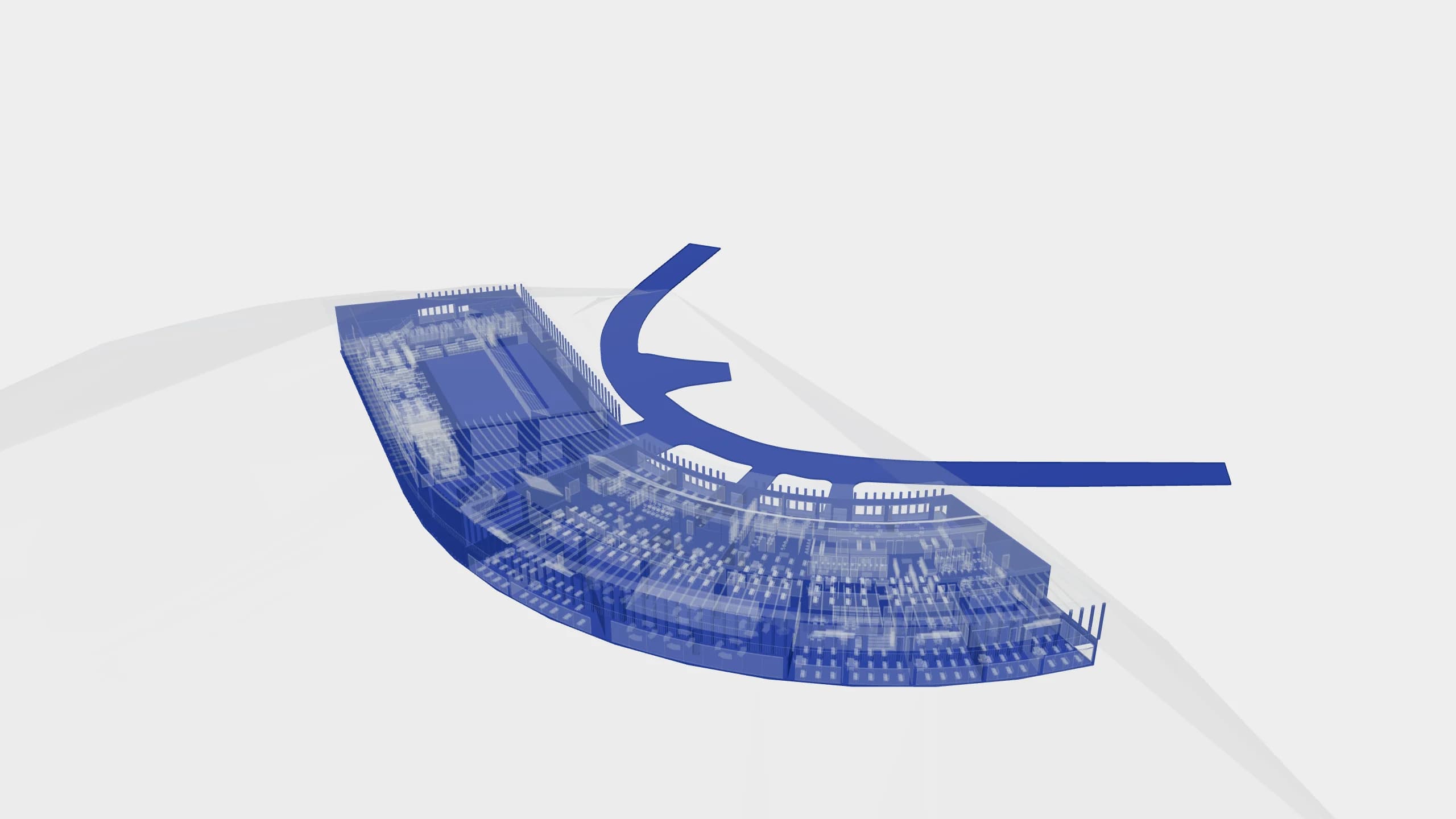
3D models go to waste.
Designers make them anyway. The file holds plenty of answers: how many square metres of glass the facade has, or how much concrete sits in the basement walls. Then the model goes to the client, and that is usually where it ends.
Most of the people who could use the model did not author it. The investor, the general contractor, the cost estimator, the site inspector. Their companies often have no software that can open the file. And even when a free viewer opens it, a simple quantity question needs someone who knows which property set to look in. So decisions are made again from PDFs and hand-copied schedules, and when something is missing, someone emails the designer and waits.
The problem is not new, and building owners pay the most for it. In the United States, the cost of poor data exchange between companies and software was estimated in 2004 at 15.8 billion dollars a year. Two thirds of that is paid by owners and operators, mostly during operation. Ten years later, 68% of US owners who had delivered projects in BIM rated their ability to use the model after construction as none or low. The as-built model reaches the client at handover, but rarely does anyone on their side know how to work with it, so BIM lives mainly in design and on site. In Poland, where I work, BIM is still used by a minority of the industry. In a 2023 Kantar survey for Autodesk, 41% of design firms, 37% of investors and only 21% of construction companies delivered projects in BIM. Investors most often named the small number of BIM specialists as the barrier (86%).
"70% [of the industry is engaged in] model production, but only 15% or so are using BIM."
Lars Christiansen, former co-chair of buildingSMART International, on the Scandinavian market (McGraw Hill Construction, 2014)
The common assumption today is that reading a model takes a complex tool and a specialist. I think it does not have to. You can just ask the model. An AI agent finds the right data, does the counting and shows where the result came from.
I wanted to test this in practice: drop an IFC file into the browser, see the model in 3D and ask it questions in plain language. That is how the prototype in this post came about.
What I built
First, a short demo on an office building model.
You drop an IFC file. A few seconds later you see the model in 3D, with a chat window next to it. You ask in plain language, for example about the glazing area on each storey. The agent answers with a table of numbers. Under the answer you can see the queries those numbers came from, and the model highlights exactly the elements it counted. The interface is in Polish, so the screenshots below are too.
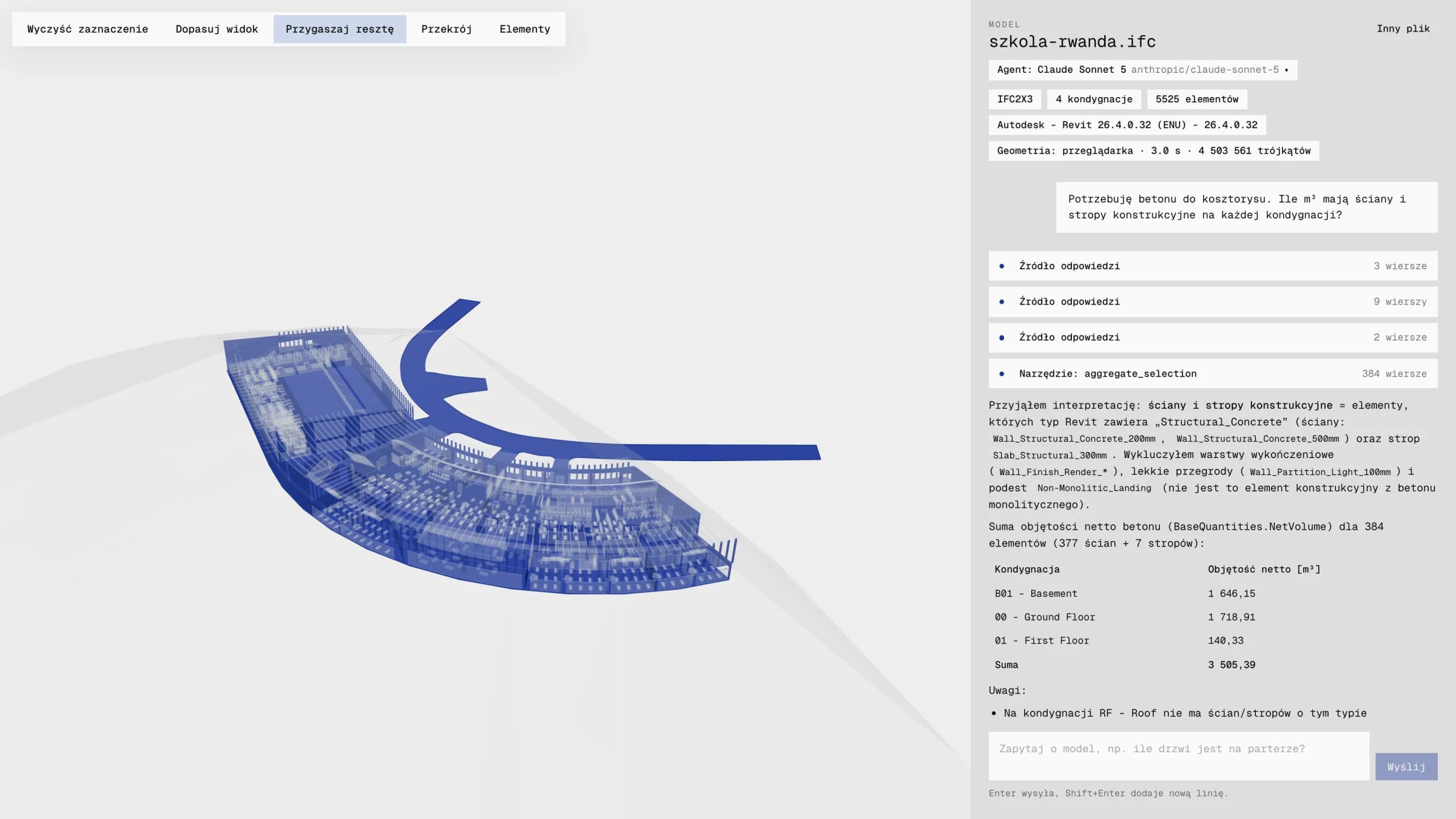 A question about concrete for the cost estimate. On the right the answer and its sources, on the left the counted elements in the model.
I borrow the word "harness" from agent engineering. It means everything around the language model: what it sees at the start, which tools it gets, what it is not allowed to do and how its answers are checked.
The language model itself is interchangeable. I pick it from a list in the interface: Claude Sonnet 5 worked on the school, and the cheap DeepSeek V4.1 Flash on the office building. DeepSeek is the one answering in the video: each answer arrives in 2 to 7 seconds and costs about a cent at most. This kind of work does not need the most expensive language models, like Claude Opus. Whether an answer is good enough for a cost estimate depends on the harness, not on how smart the model is.
I say on purpose that the agent reads the model. "Understands" would be overstating it. The agent does not see the massing, does not know what sits next to what and does not look for clashes. It reads the data that is in the model, the way a designer reads it when opening a schedule. What is missing from the data, it calls a gap. That is a smaller promise, but every number can be checked.
Five assumptions
The agent gets a map of the model
The office building model I tested the prototype on was over 240 MB and had almost 228 thousand properties. That cannot be pasted into a conversation with a language model. And even if it could, quantity questions need arithmetic, not reading.
So right after upload, the server turns the file into a database. The agent gets only a model card for the conversation: which element classes and storeys exist, which properties occur, which values they actually hold and what is missing. It fetches the details itself, with database queries. A bit like a new person in an office who does not learn the project by heart, but gets the table of contents and access to the schedules.
Every number has a source
The agent has one hard rule: every number in the answer must come from a query run in this conversation. No estimating and no "about". Each such query is visible under the answer as "Answer source" or "Tool". You can expand it and read it.
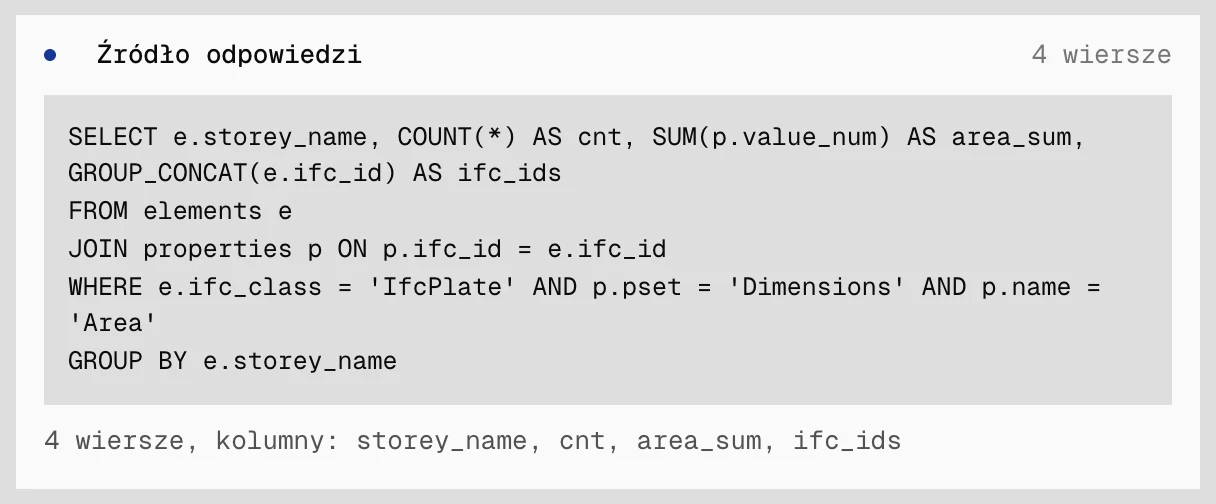 The source of the glazing answer: one query, four rows, one per storey.
After the answer, the app goes over the numbers once more (it skips small integers and percentages) and checks whether each one is backed by the query results, with a tolerance for rounding. If so, a "Numbers match the queries" badge appears under the answer. If not, the app lists the unbacked numbers. This check runs after the fact and blocks nothing. I treat it as a sensor, not a gate, and I would rather say so plainly.
You can see the answer in the model
The database and the 3D viewer use the same element identifier. So a query result lights up in the model right away, and the rest of the building fades. The table says how many. The model shows which ones. Trust in a number grows when you can see it.
It works the other way too. Clicking an element opens its card with properties, storey and the room it stands in. From the card you can ask the agent about that element straight away.
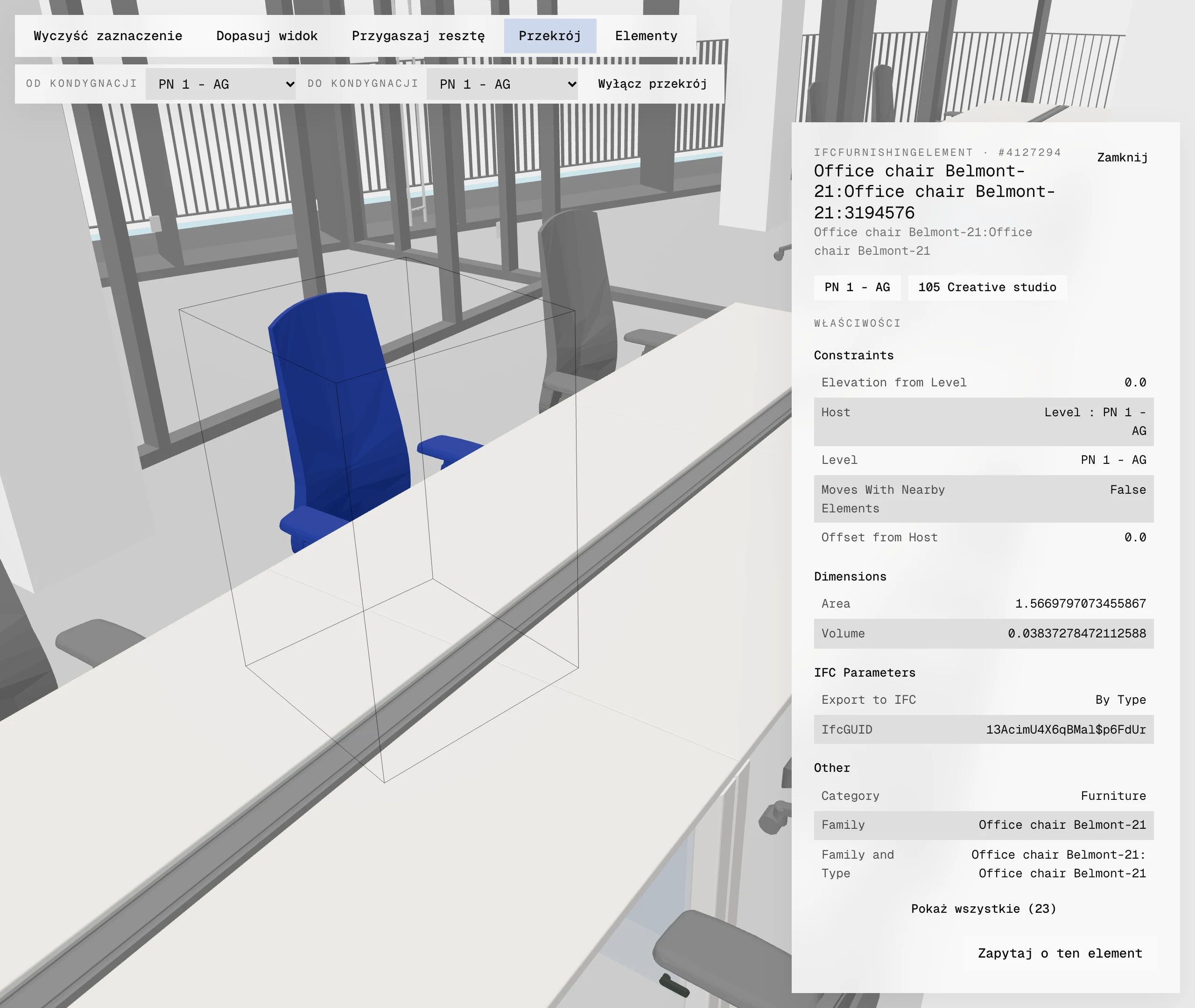 The office building cut down to the first floor. One click on a chair and its data card.
Heavy work once, geometry on the user's machine
From the start I wanted this to be light on resources. The user's browser computes the geometry, with a library compiled to WebAssembly, so the server spends no CPU time on it. The server analyses the file once, in a separate process that frees its memory afterwards. After that, database queries usually take under a millisecond.
In numbers: the school model from this post (44 MB, 4.5 million triangles) renders in the browser in about 3 seconds. Analysing the office building (242 MB) took the server 15 seconds. Claude Sonnet 5 handled the questions about the school: the glazing answer took 63 seconds and cost $0.09, the concrete answer 39 seconds and $0.06. I asked DeepSeek V4.1 Flash about the ground floor and first floor of the office building. In the first tests these requests went to the cheapest providers of that model: each answer took about a minute and cost $0.001 to $0.002. After a settings change (fastest provider instead of cheapest), the same model answers in the video in 2 to 7 seconds, and an answer costs $0.004 to $0.011.
The agent only reads
The agent can query the database but cannot change the model data. Code enforces this, not a request in the instructions: only queries that read data get through to the database. The one thing the agent can write is an entry in the project glossary, and only after the user agrees. It does not fill in missing information. If something is not in the model, it says so directly and names the data that is missing.
Two questions for the school model
The screenshots in this post come from the model of the school concept in Kibeho that I show in my portfolio, and from the office building model. The school model is a Revit export to IFC2X3: 5,525 elements on four storeys. It is a concept model, which will matter in a moment.
How much glass
The first question was: "What is the glazing area on each storey?".
This model has not a single window (an element of class IfcWindow). The glazing is curtain wall panels. The agent worked this out by itself: it found 454 glass panels, summed their area (1,516.79 m²) and split it by storey. It listed three roof skylights separately. It did not add them to the total and wrote why: the model gives their area in plan, not the actual area of the sloped glazing. It also noted where the panel area came from. It is a Revit parameter, because the file has no standard IFC quantities with an area for this class.
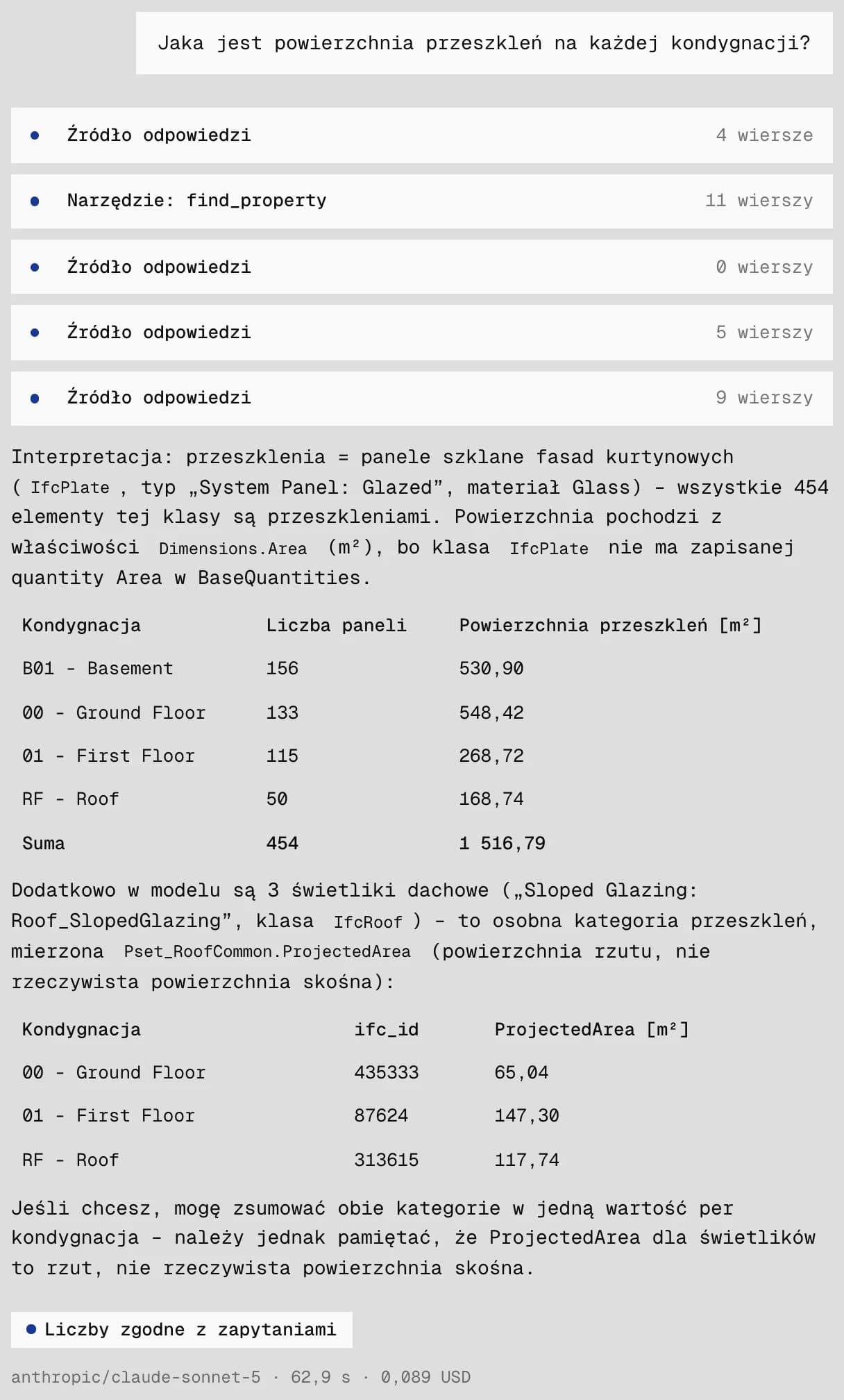 The glazing answer. The agent showed the roof skylights separately and did not add them to the total.
I like this answer more than the number itself. The agent did what a careful person would do: before counting, it checked how glass was recorded in this particular file, and at the end it said what it had left out.
How much concrete for the estimate
I asked the second question the way a cost estimator might: "I need concrete for the cost estimate. How many m³ do the structural walls and slabs have on each storey?".
The agent started by working out what counts as structure in this model. It took the walls and slabs whose type name contains "Structural_Concrete" or "Slab_Structural". It left out plaster, light partitions and the stair landing. Result: 3,505.39 m³ of concrete in 384 elements, split by storey.
Under the table it added notes. A cost estimator should read two of them before the number. Only 217 of the 384 elements have a gross volume, so it used net volume. The material in every layer is a generic "Koncepcyjny Czarny" (Conceptual Black), so the model does not know the concrete grade.
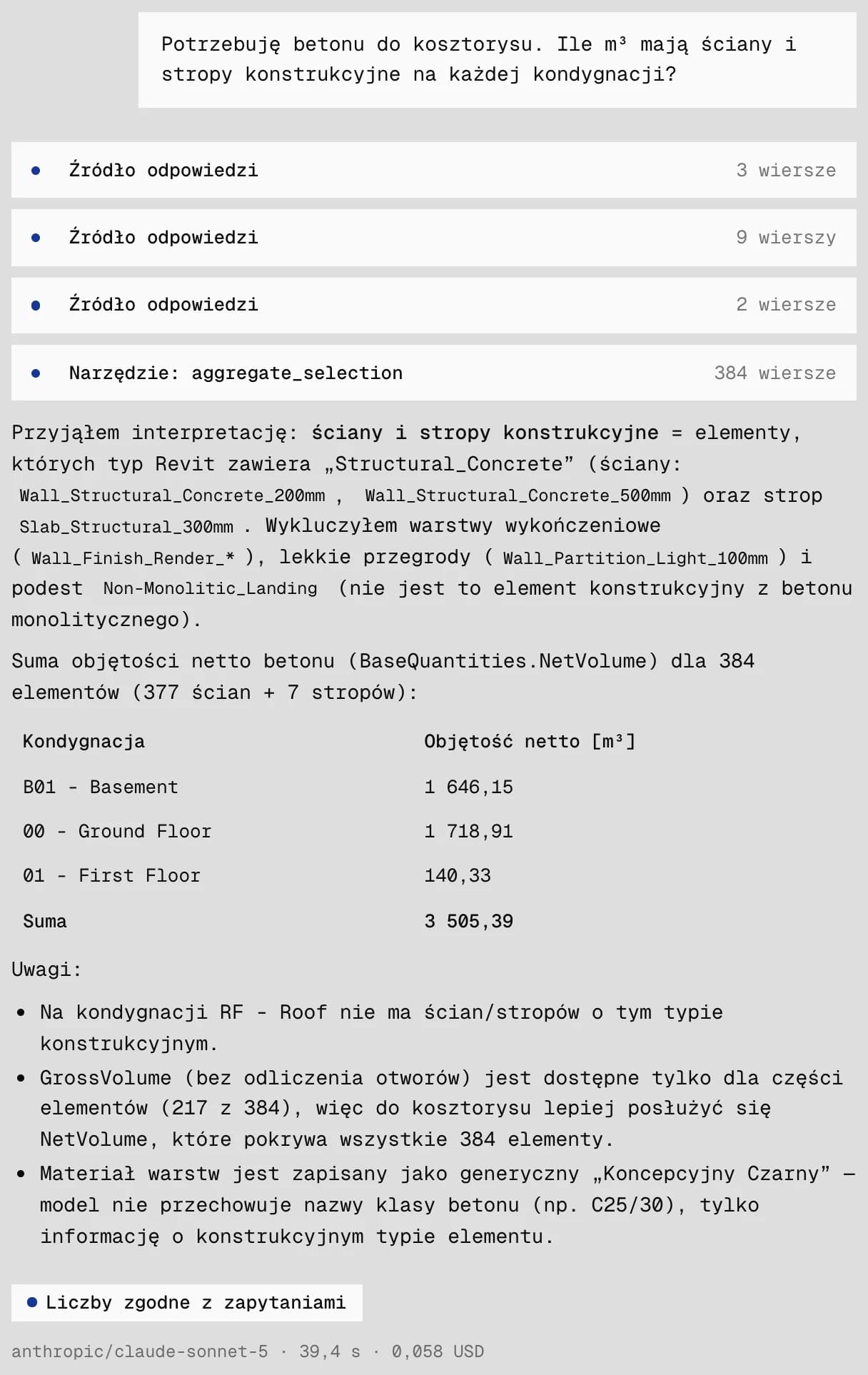 The concrete answer. The notes under the table matter most.
A cost estimate is only as good as the model
I want to stop here, because this is where the whole idea has its limit.
The agent counted the concrete because the designer named the wall types so that structure and material can be read from them. If the same walls were called "Wall 1" and "Wall 2", the agent would have nothing to hold on to. The material tells it nothing, because in a concept model it is only a working label. The concrete grade is nowhere, so pricing still needs a person.
The second thing only shows up in 3D. The long, curved strip in front of the building is a 300 mm structural slab in the model. The agent counted it like any other slab, so that concrete is in the result. Whether that is right, only the designer knows. The agent counts what is in the model, not what someone meant. That is why I treat the highlight as part of the answer: one look shows what went into the total.
The app shows the third thing before the first question is asked. The model card says plainly that this file has no rooms, so questions about room areas will not work. Four element classes, stairs among them, have no exported quantities.
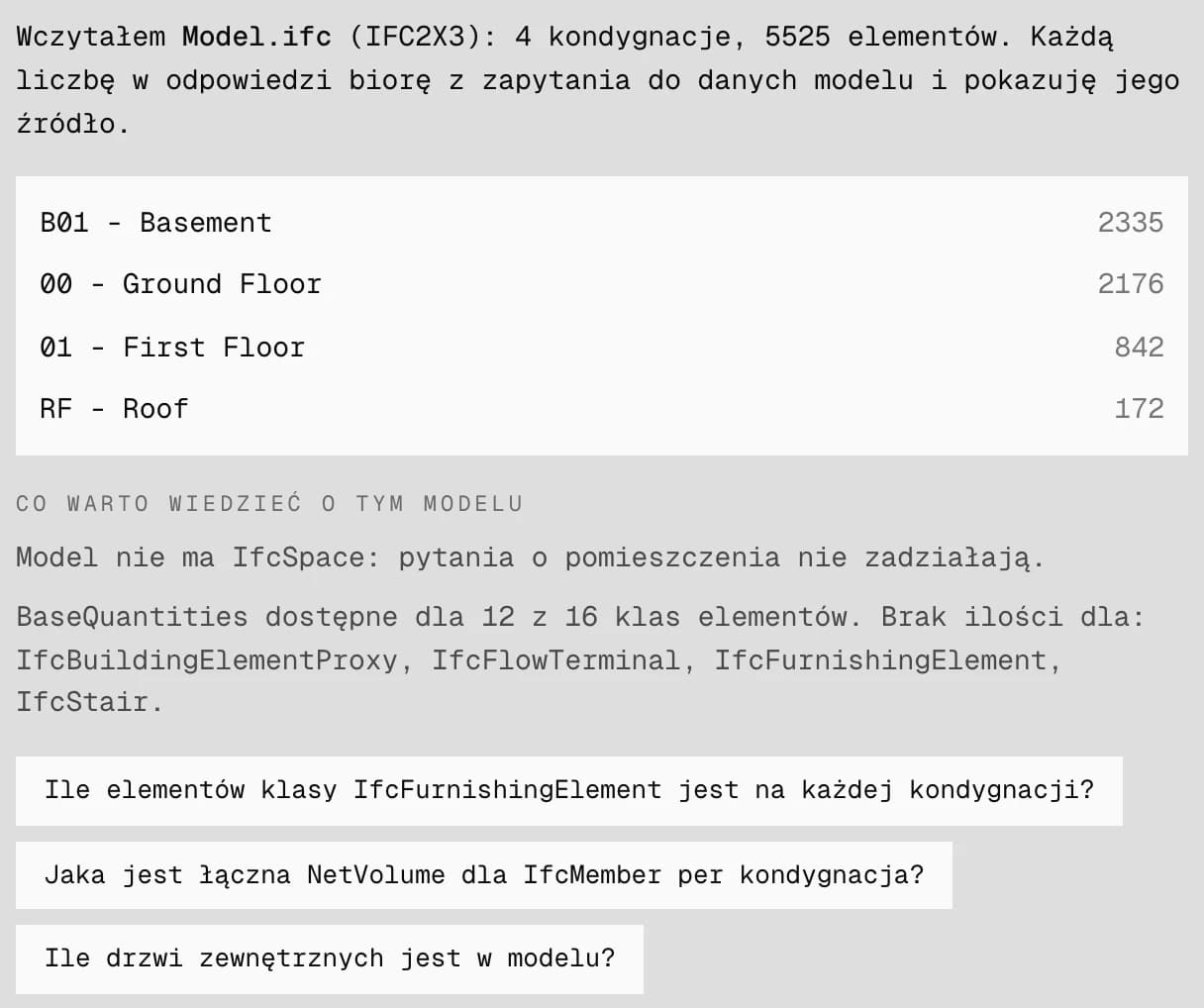 The model card. Notes about gaps in the data are visible before the first question.
In the office building model, the agent itself reported 112 plasterboard walls marked as external and 107 chairs with no storey assigned. The tool will not fix the model. What it can do is quickly show what the model lacks, before someone bases a cost estimate on it.
If a model is meant for quantity take-off, working on this prototype gives me a few simple requirements:
- element types named so that function and material are visible from the name,
- real materials instead of working labels,
- quantities (BaseQuantities) exported for every class that goes into the cost estimate,
- elements assigned to storeys,
- rooms in the model, if questions are going to be about areas.
None of this is new to anyone who works in BIM. What is new is that the agent shows within a minute which of these points is weak in a given file.
The second model: an office building
The school is a concept model, so I also tested an office building: 7,049 elements and 26 rooms. The file has not a single IFC storey, so the app reconstructs storeys from Revit parameters. I cut the building with a section box down to one storey, and asked the questions about the ground floor and first floor to the cheaper model, DeepSeek V4.1 Flash.
The ground floor in section
The section leaves only the chosen storey in the model and reveals its interior. On the ground floor you can see partitions, stairs and furniture.
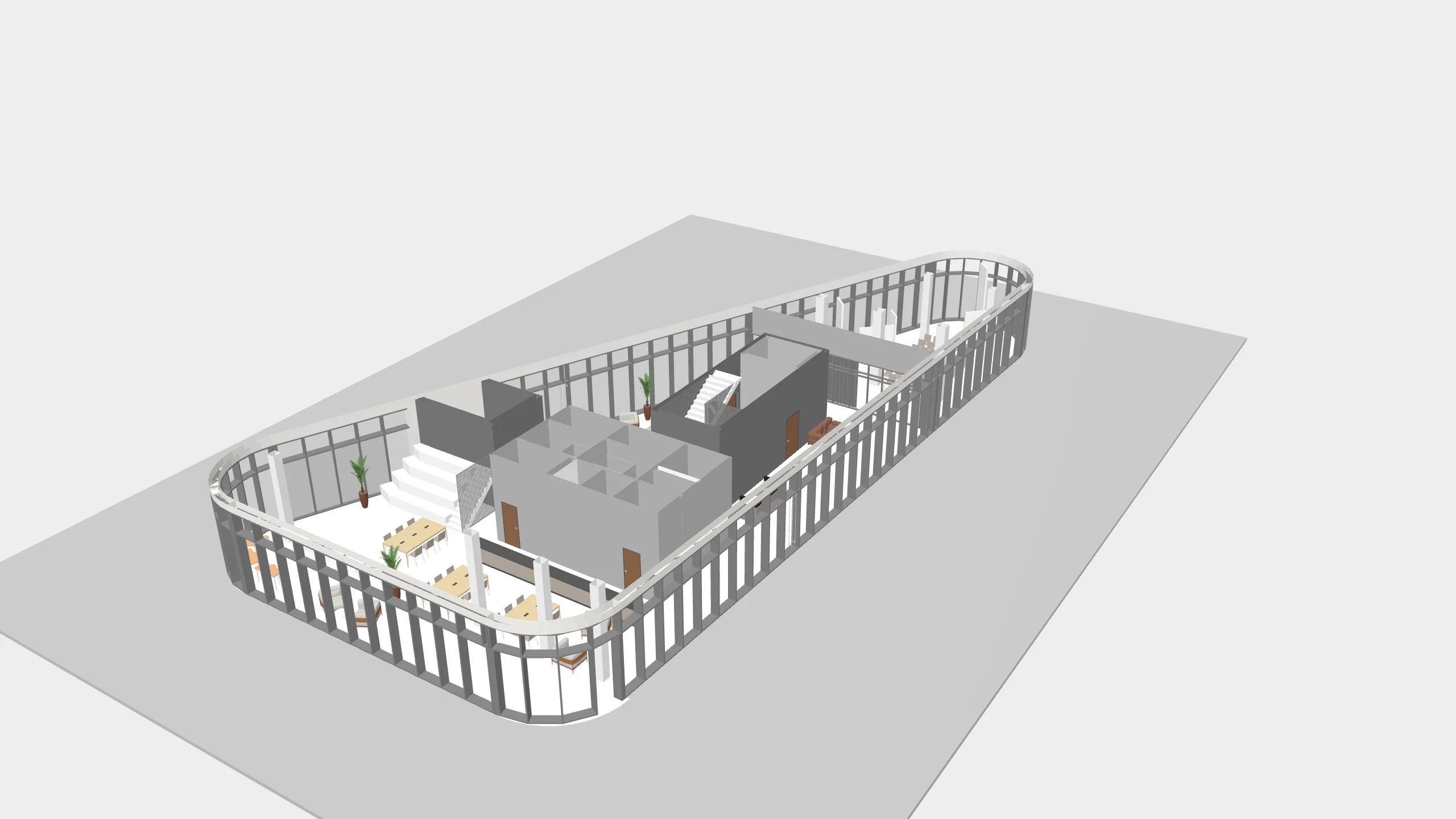 The office building cut by a section to the ground floor.
To the question "Which rooms are on the ground floor and what are their areas?", the agent worked out by itself which level in this file is the ground floor and answered with a table of 14 rooms with numbers, names and areas, 508.08 m² in total. The answer took under a minute and cost $0.002. The rooms lit up in the model as semi-transparent volumes against the interior.
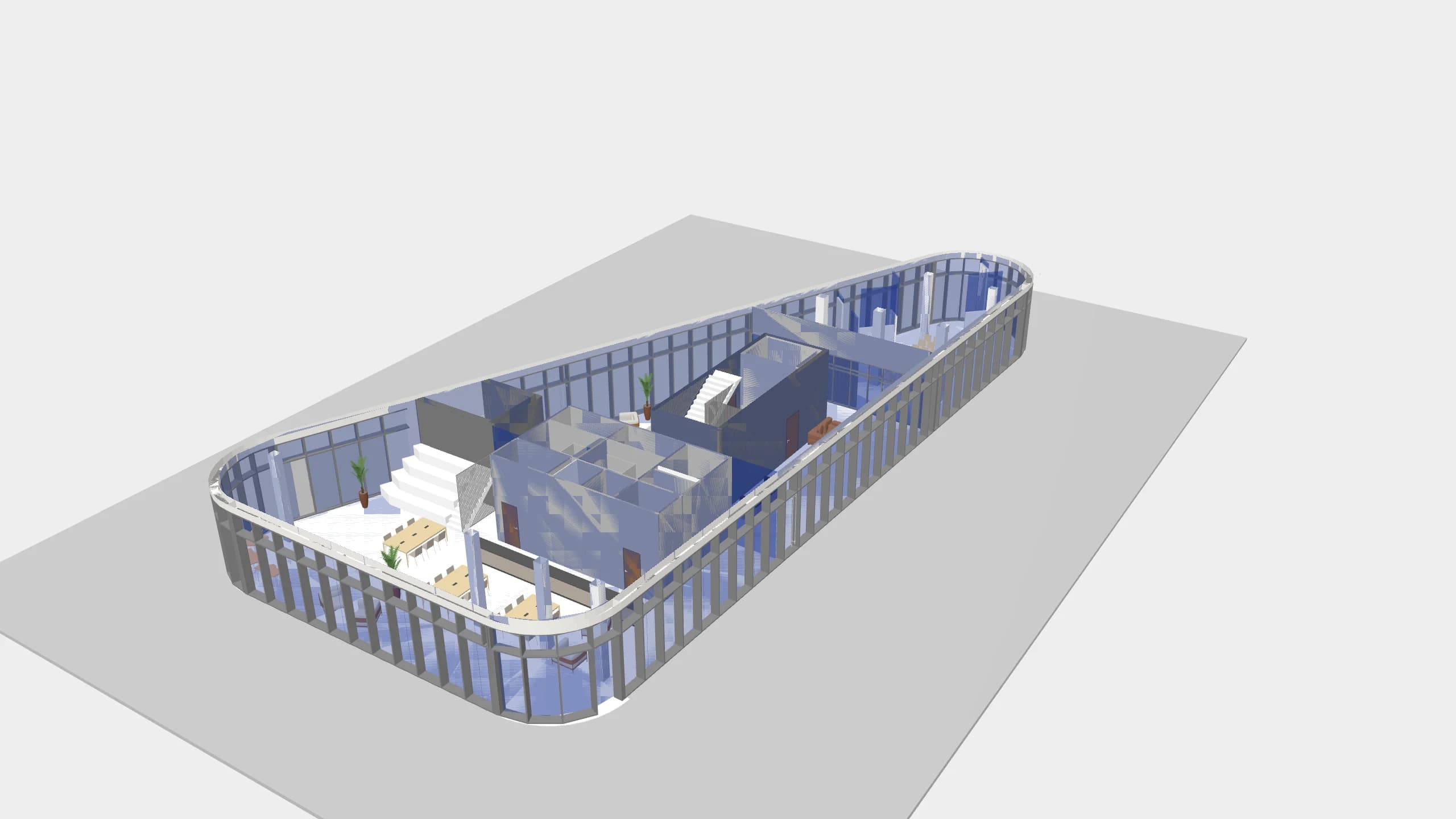 The ground floor rooms the agent summed, against the interior of the storey.
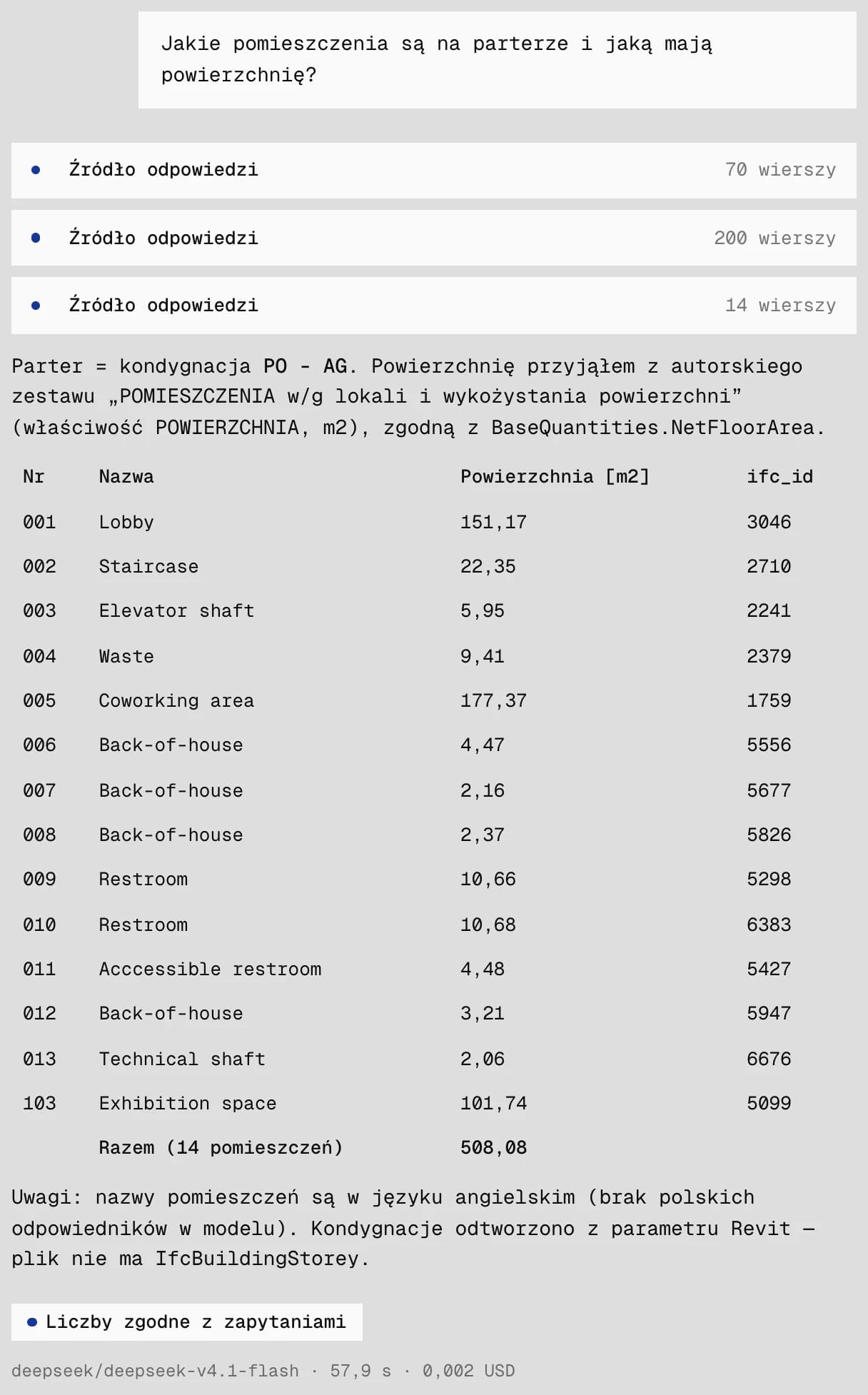 The answer from DeepSeek V4.1 Flash. At the bottom, the language model's name and the answer's time and cost.
The first floor
The next question: "How many chairs are on the first floor?". Here too it first worked out which storey is the first floor, and found 24 chairs in three rooms. It counts what the model recorded as a chair. Stools modelled together with tables are part of the table in this file, so they are not in this number.
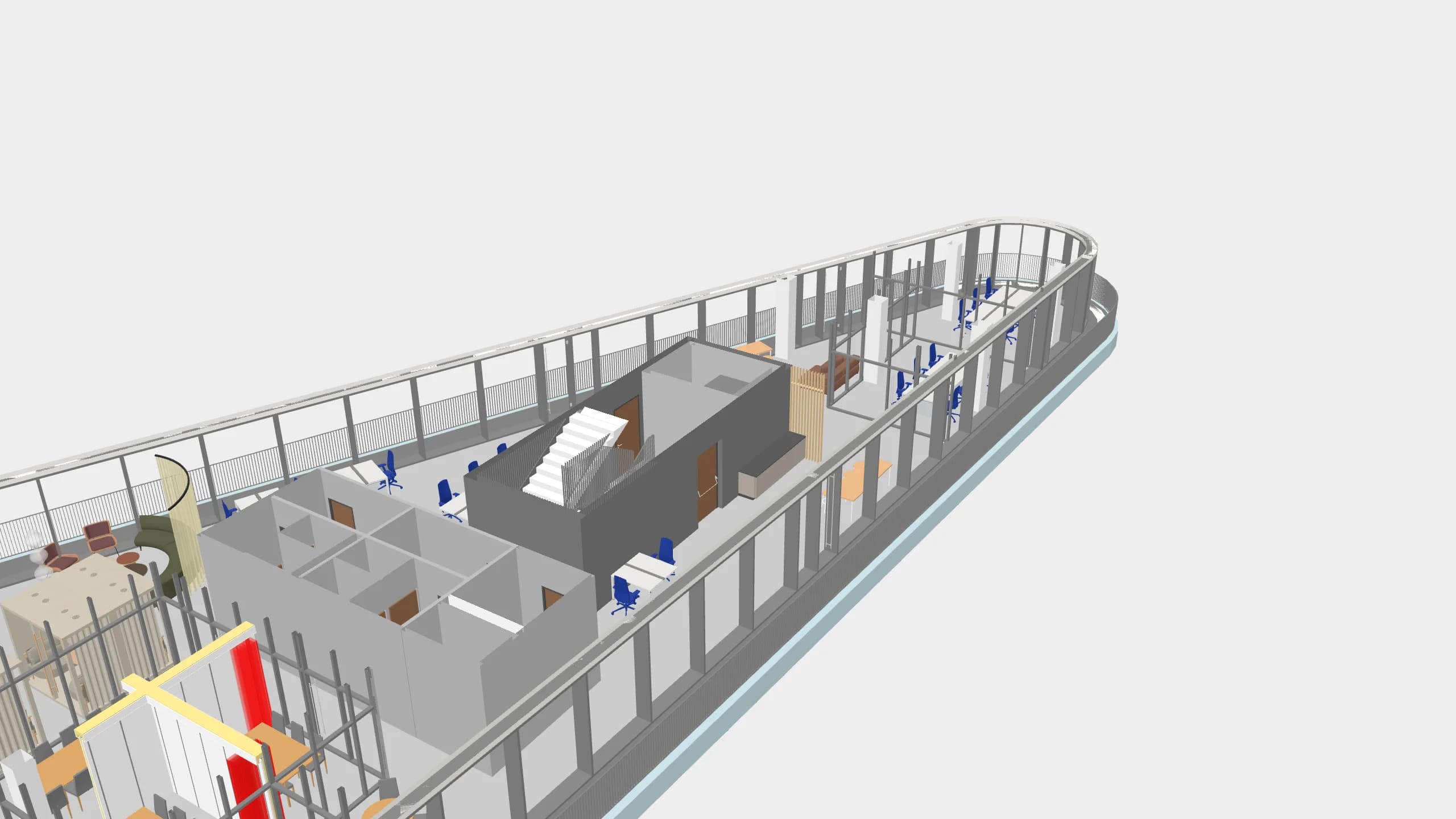 The first floor in section. The 24 chairs the agent counted, against the interior.
Concrete in the stair core walls
Claude Sonnet 5 got a harder question: "How many m³ of concrete do the staircase walls have?". The model has a room called "Staircase", but no wall records that it belongs to it. This is a question about location, and the agent does not see geometry.
The agent did not give a number straight away. It wrote that the model does not link the walls to the staircase and listed what it was missing. It made a mistake in one sentence: it wrote that no room is called a staircase, although "Staircase" is in the model. The consistency badge will not catch that, because it checks numbers, not sentences.
When I asked it to check the core walls, it found 12 walls marked as "structural core", starting on three levels, and asked whether to count them. After "yes" it gave 229.47 m³ of reinforced concrete, and 279.19 m³ including insulation and plaster. I checked this in the database and the result matches to the hundredth.
The agent was not sure whether these walls form one core and suggested I check in 3D. One look was enough: it is a continuous core from foundation to roof. Whether the whole core is the staircase, or the staircase plus a lift shaft, the designer would decide. This division of work suits me. The agent counts and says what it does not know. A person looks and confirms.
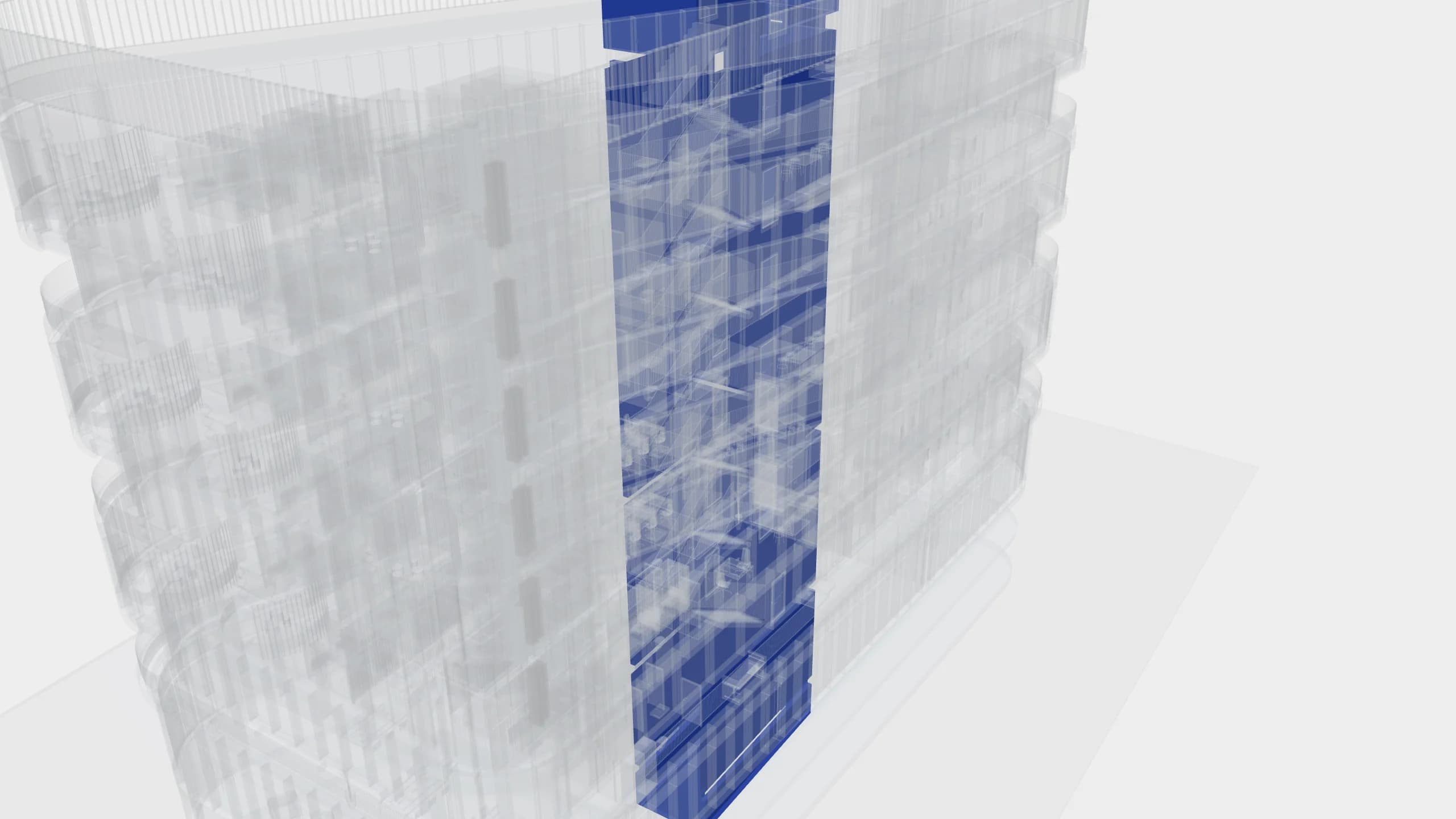 The 12 core walls counted after the follow-up questions. In 3D you can see at once that they form one continuous core.
What it does not do
- It does not see geometry. It knows which room an element stands in only if the model recorded it. It will not infer that from position, and it will not say what sits next to what or where the clashes are. Questions about location, like the one about the staircase, need a person and the 3D view.
- It does not compare model versions.
- Large models load the user's computer memory. The office building (242 MB) is 11.6 million triangles in the browser, so it needs a powerful computer.
- It only runs on my computer. It is still a prototype.
Not every question has to go through the agent either. The app has an ordinary panel with a class tree: I click on slabs and immediately get their count per storey, quantity totals and materials, without a language model. In a previous post I wrote that sometimes a boring piece of ordinary software is a better choice than an agent. The same holds here. The agent is for the questions I do not know the way to.
Does this make sense beyond my desk?
Models get made anyway, and reading them does not have to require specialist software. The prototype answers within a minute questions that would take me much longer to dig out of schedules myself. I do not know yet whether it is a tool or a curiosity. I cannot settle that alone at my desk.
So I am asking. Do you see value in this for your work? What would you ask your model first? And if you have an IFC model and would like to test this on it, write to me. I would be glad to go through such a test with you.